<?xml version="1.0" encoding="utf-8"?><feed xmlns="http://www.w3.org/2005/Atom" ><generator uri="https://jekyllrb.com/" version="4.4.1">Jekyll</generator><link href="https://arduinojson.org/feed.xml" rel="self" type="application/atom+xml" /><link href="https://arduinojson.org/" rel="alternate" type="text/html" /><updated>2026-03-09T14:59:01+00:00</updated><id>https://arduinojson.org/feed.xml</id><title type="html">ArduinoJson</title><subtitle>C++ JSON library for IoT. Simple and efficient.</subtitle><author><name>BenoitBlanchon</name></author><entry><title type="html">Important security update</title><link href="https://arduinojson.org/news/2026/03/02/security-update/" rel="alternate" type="text/html" title="Important security update" /><published>2026-03-02T00:00:00+00:00</published><updated>2026-03-02T00:00:00+00:00</updated><id>https://arduinojson.org/news/2026/03/02/security-update</id><content type="html" xml:base="https://arduinojson.org/news/2026/03/02/security-update/"><![CDATA[<p>Two days ago, GitHub user <a href="https://github.com/xD0135">@xD0135</a> reported a <a href="https://github.com/bblanchon/ArduinoJson/issues/2220">major vulnerability</a> that affects ArduinoJson’s parser.</p>

<p>The vulnerabity originates from a buffer overrun in the string-to-float conversion code.
This bug can be triggered by sending a JSON document that contains a string with a large number of digits.
It can be used to remotely crash a device and potentially read the device’s memory.</p>

<p>I urge you to update any program that is exposed to untrusted connections, such as a server connected to the Internet.
To make the upgrade as easy as possible, I also published updates for old ArduinoJson versions:</p>

<ul>
  <li><a href="https://github.com/bblanchon/ArduinoJson/releases/tag/v7.4.3">ArduinoJson 7.4.3</a></li>
  <li><a href="https://github.com/bblanchon/ArduinoJson/releases/tag/v7.3.2">ArduinoJson 7.3.2</a></li>
  <li><a href="https://github.com/bblanchon/ArduinoJson/releases/tag/v7.2.2">ArduinoJson 7.2.2</a></li>
  <li><a href="https://github.com/bblanchon/ArduinoJson/releases/tag/v6.21.6">ArduinoJson 6.21.6</a></li>
  <li><a href="https://github.com/bblanchon/ArduinoJson/releases/tag/v5.13.6">ArduinoJson 5.13.6</a></li>
</ul>

<p>Please let me know if you need an update for another version.</p>]]></content><author><name>BenoitBlanchon</name></author><summary type="html"><![CDATA[A important vulnarity that affect all ArduinoJson versions since 5.11.1 was recently discovered. Upgrading is strongly recommended]]></summary><media:thumbnail xmlns:media="http://search.yahoo.com/mrss/" url="https://arduinojson.org/images/2026/03/arduinojson-vunerability-thumb.png" /><media:content medium="image" url="https://arduinojson.org/images/2026/03/arduinojson-vunerability-thumb.png" xmlns:media="http://search.yahoo.com/mrss/" /></entry><entry><title type="html">ArduinoJson 7.4: tiny string optimization</title><link href="https://arduinojson.org/news/2025/04/09/arduinojson-7-4/" rel="alternate" type="text/html" title="ArduinoJson 7.4: tiny string optimization" /><published>2025-04-09T00:00:00+00:00</published><updated>2025-04-09T00:00:00+00:00</updated><id>https://arduinojson.org/news/2025/04/09/arduinojson-7-4</id><content type="html" xml:base="https://arduinojson.org/news/2025/04/09/arduinojson-7-4/"><![CDATA[<p>I’m excited to announce ArduinoJson 7.4, featuring a new memory optimization for embedded systems where every byte counts. This update introduces tiny string optimization that eliminates heap allocations for strings of three characters or fewer—a targeted improvement that reduces memory fragmentation and overhead in resource-constrained environments like Arduino, ESP8266, and ESP32 devices.</p>

<h2 id="tiny-string-optimization">Tiny string optimization</h2>

<p>Small string optimization (SSO) is a widespread optimization consisting of storing short strings in preallocated buffers to avoid a heap allocation.
This optimization is present in all implementations of <code class="language-plaintext highlighter-rouge">std::string</code> and in some implementations of <code class="language-plaintext highlighter-rouge">String</code> (most notably in ESP32 and ESP8266).</p>

<p>SSO typically covers strings up to 16 or 32 characters, but in the case of ArdunoJson 7.4, the optimization only concerns strings up to three characters; this is why I call it “tiny string optimization” instead of “small string optimization”. Also, I wanted to save the name for later.</p>

<p>Specifically, the three characters (and the terminator) are stored directly in the tree node (called a “slot” in ArduinoJson’s source code), whereas long strings are allocated in the heap and added to a linked list. A slot has a 4-byte payload, hence the four characters (including the terminator).</p>

<p>Admittedly, three characters are not much and don’t include that many strings. Still, it’s not rare to see short mnemonics, such as <code class="language-plaintext highlighter-rouge">id</code>, <code class="language-plaintext highlighter-rouge">url</code>, <code class="language-plaintext highlighter-rouge">img</code>, <code class="language-plaintext highlighter-rouge">ref</code>, <code class="language-plaintext highlighter-rouge">lat</code>, <code class="language-plaintext highlighter-rouge">lng</code>, etc.</p>

<p>Now, such a fine-grain optimization will not dramatically lower memory consumption. In most cases, the change is marginal. For instance, we only see a 0.74% decrease in the OpenWeatherMap example.
However, the new version can consume half as much memory in extreme cases such as this:</p>

<div class="language-json highlighter-rouge"><div class="highlight"><pre class="highlight"><code><span class="p">[</span><span class="s2">"JFK"</span><span class="p">,</span><span class="s2">"LAX"</span><span class="p">,</span><span class="s2">"ORD"</span><span class="p">,</span><span class="s2">"ATL"</span><span class="p">,</span><span class="s2">"SFO"</span><span class="p">,</span><span class="s2">"DFW"</span><span class="p">,</span><span class="s2">"MIA"</span><span class="p">,</span><span class="s2">"LAS"</span><span class="p">]</span><span class="w">
</span></code></pre></div></div>

<p>Even if the impact is low, it’s still good to reduce small heap allocations because they come with significant memory and time overheads. It also reduces heap fragmentation, which, <a href="https://cpp4arduino.com/2018/11/06/what-is-heap-fragmentation.html">as we already discussed</a>, is crucial in embedded environments.</p>

<p>In addition, there is a slight performance boost because we don’t deduplicate tiny strings anymore. This avoids searching for duplicates in the string pool, which saves some CPU time.</p>

<h2 id="code-size">Code size</h2>

<p>As usual, I kept an eye on the library size to ensure the increase was on par with the improvements. In the following graphs, you can see the evolutions of the size of the ArduinoJson examples on Arduino UNO R3, an 8-bit microcontroller, and Arduino UNO R4, which is 32-bit.</p>

<script type="application/json" data-chart="">
{"type":"line","data":{"labels":["v6.10","v6.11","v6.12","v6.13","v6.14","v6.15","v6.16","v6.17","v6.18","v6.19","v6.20","v6.21","v7.0","v7.1","v7.2","v7.3","v7.4"],"datasets":[{"label":"JsonParserExample","data":[6978,7038,7038,7050,6968,6830,6924,6718,6714,6740,6784,6758,9458,9458,9902,9842,9922],"borderColor":"#00878F"},{"label":"JsonGeneratorExample","data":[5772,5756,5756,5752,5752,5738,5738,5558,5456,5560,5588,5578,8120,8094,8016,8358,8574],"borderColor":"#62AEB2"},{"label":"MsgPackParser","data":[7138,7122,7122,7176,7176,7258,7126,6958,7110,7142,7110,7080,9610,9390,9676,9602,9768],"hidden":true,"borderColor":"#E47128"},{"label":"StringExample","data":[10072,10174,10174,10538,11120,11042,11264,11032,11102,10968,10728,10698,12244,12252,13216,12234,12524],"borderColor":"#E5AD24"}]},"options":{"maintainAspectRatio":false,"plugins":{"title":{"display":true,"text":"Examples size on Arduino UNO R3"}}}}
</script>

<script type="application/json" data-chart="">
{"type":"line","data":{"labels":["v6.10","v6.11","v6.12","v6.13","v6.14","v6.15","v6.16","v6.17","v6.18","v6.19","v6.20","v6.21","v7.0","v7.1","v7.2","v7.3","v7.4"],"datasets":[{"label":"JsonParserExample","data":[43620,43612,43612,43628,43556,43548,43516,42524,42500,42860,42928,42912,44324,44324,45140,45292,45372],"borderColor":"#00878F"},{"label":"JsonGeneratorExample","data":[41248,41236,41236,41228,41228,41212,41212,41188,41072,41736,41836,41640,42780,42804,43048,43280,43432],"borderColor":"#62AEB2"},{"label":"MsgPackParser","data":[43520,43456,43456,43456,43456,43480,43512,42524,42644,43292,43288,43272,44460,43964,44740,44868,44980],"borderColor":"#E47128","hidden":true},{"label":"StringExample","data":[44336,44504,44504,44528,44724,44760,44872,44856,45072,45668,45600,45528,46884,46852,47732,47468,47628],"borderColor":"#E5AD24"}]},"options":{"maintainAspectRatio":false,"plugins":{"title":{"display":true,"text":"Examples size on Arduino UNO R4"}}}}
</script>

<h2 id="other-progress">Other progress</h2>

<blockquote class="fst-italic">
  <p>We waited three months for a new release, and all you could come up with was a 0.74% optimization. Is that all you got?</p>
</blockquote>

<p>I’ve been working on a more significant memory optimization but rolled it back when I realized that the tiny-string optimization had to be done first. So, you’re right. I don’t have much to show about the ArduinoJson library.</p>

<p>However, in the meantime, I worked on modernizing the internals of the <a href="/v7/assistant/">ArduinoJson Assistant</a> and the <a href="/troubleshooter/">ArduinoJson Troubleshooter</a>. I also added many small features along the way. For example, you can now directly paste the compiler output to the Troubleshooter, and it will scan it to find the appropriate answer. How cool is that?</p>

<h2 id="final-words">Final words</h2>

<p>ArduinoJson is quite a mature project now, so it’s normal for the release pace to get slower.
The simple optimizations have already been implemented, and the next level will require a massive amount of work, so it might take a while before I publish a new version.</p>

<p>Remember that you can support my work by purchasing my <a href="/book/">book</a> or <a href="https://github.com/sponsors/bblanchon">sponsoring me on GitHub</a>.
Don’t forget to subscribe to the mailing list for future updates.</p>]]></content><author><name>BenoitBlanchon</name></author><summary type="html"><![CDATA[ArduinoJson now includes a memory optimization for strings with three characters or less. It stores the characters directly in the slot, avoiding a costly heap allocation.]]></summary><media:thumbnail xmlns:media="http://search.yahoo.com/mrss/" url="https://arduinojson.org/images/2025/04/arduinojson-7-4-0-thumb.png" /><media:content medium="image" url="https://arduinojson.org/images/2025/04/arduinojson-7-4-0-thumb.png" xmlns:media="http://search.yahoo.com/mrss/" /></entry><entry><title type="html">ArduinoJson 7.3: safer copy policies</title><link href="https://arduinojson.org/news/2024/12/29/arduinojson-7-3/" rel="alternate" type="text/html" title="ArduinoJson 7.3: safer copy policies" /><published>2024-12-29T00:00:00+00:00</published><updated>2024-12-29T00:00:00+00:00</updated><id>https://arduinojson.org/news/2024/12/29/arduinojson-7-3</id><content type="html" xml:base="https://arduinojson.org/news/2024/12/29/arduinojson-7-3/"><![CDATA[<p>I just released ArduinoJson 7.3, which introduces a few changes in how strings are copied. While technically a breaking, it should be transparent for most people. This release also prevents copying the internal proxy objects, which might affect you if you use the <code class="language-plaintext highlighter-rouge">auto</code> keyword in your programs.</p>

<h2 id="new-string-copy-policy">New string copy policy</h2>

<p>The string copy policy refers to how ArduinoJson stores strings in the <a href="/v7/api/jsondocument/"><code class="language-plaintext highlighter-rouge">JsonDocument</code></a>. Most strings are stored by copy, meaning the characters are copied into the <a href="/v7/api/jsondocument/"><code class="language-plaintext highlighter-rouge">JsonDocument</code></a>; other strings are stored by pointer, meaning the <a href="/v7/api/jsondocument/"><code class="language-plaintext highlighter-rouge">JsonDocument</code></a> only saves the address of the character array.</p>

<p>Storing a pointer is more efficient but unsafe if not used cautiously. Indeed, this pointer may become invalid if the string is destroyed, leading to an undefined behavior. The device would usually crash or spit random characters, but it could also accidentally work.</p>

<p>Since ArduinoJson 5.13, released 7 years ago, the policy has been the following: all strings are stored by copy, except <code class="language-plaintext highlighter-rouge">const char*</code>, which is stored by address. The motivation was to ensure that string literals would not be copied wastefully. Indeed, literals reside at fixed memory locations and, therefore, are safe to store by address.</p>

<p>Unfortunately, there are many situations where you get a <code class="language-plaintext highlighter-rouge">const char*</code> that doesn’t point to a string literal. For example, if a third-party function returns a <code class="language-plaintext highlighter-rouge">const char*</code>, it is usually unsafe to store it by address. This was a major pitfall of ArduinoJson, and many of you fell into it.</p>

<p>With ArduinoJson 7.3, I changed the string copy policy so that <code class="language-plaintext highlighter-rouge">const char*</code> is by copy, too. Thanks to <a href="https://en.wikipedia.org/wiki/Template_metaprogramming">template metaprogramming</a> witchcraft, ArduinoJson still stores string literals by copy. Instead of using the type <code class="language-plaintext highlighter-rouge">const char*</code>, it now detects literals with the type <code class="language-plaintext highlighter-rouge">const char(&amp;)[N]</code>, which you are unlikely to use for temporary strings.</p>

<table class="table table-bordered w-auto mx-auto">
  <thead>
    <tr>
      <th style="text-align: left">String type</th>
      <th style="text-align: left">Storage</th>
    </tr>
  </thead>
  <tbody>
    <tr>
      <td style="text-align: left"><code class="language-plaintext highlighter-rouge">char[]</code></td>
      <td style="text-align: left">by copy</td>
    </tr>
    <tr>
      <td style="text-align: left"><code class="language-plaintext highlighter-rouge">char*</code></td>
      <td style="text-align: left">by copy</td>
    </tr>
    <tr>
      <td style="text-align: left"><code class="language-plaintext highlighter-rouge">const char*</code></td>
      <td style="text-align: left">by <del>address</del> copy</td>
    </tr>
    <tr>
      <td style="text-align: left"><code class="language-plaintext highlighter-rouge">const char[]</code></td>
      <td style="text-align: left">by copy</td>
    </tr>
    <tr>
      <td style="text-align: left"><code class="language-plaintext highlighter-rouge">const char(&amp;)[N]</code></td>
      <td style="text-align: left">by address</td>
    </tr>
    <tr>
      <td style="text-align: left"><code class="language-plaintext highlighter-rouge">String</code></td>
      <td style="text-align: left">by copy</td>
    </tr>
    <tr>
      <td style="text-align: left"><code class="language-plaintext highlighter-rouge">std::string</code></td>
      <td style="text-align: left">by copy</td>
    </tr>
  </tbody>
</table>

<p>This new policy might require some changes in your code. For example, with previous versions of ArduinoJson, when you wanted to bypass the copy policy to force storing a pointer, you would usually cast the pointer to <code class="language-plaintext highlighter-rouge">const char*</code>. This trick doesn’t work anymore.</p>

<p>Now, if you want to store a pointer to a string that is not a literal, you must wrap it with a <code class="language-plaintext highlighter-rouge">JsonString</code> and pass <code class="language-plaintext highlighter-rouge">true</code> as the last argument to tell that the string is safe to store by pointer</p>

<div class="language-diff highlighter-rouge"><div class="highlight"><pre class="highlight"><code>  char buffer[256];
  sprintf(buffer, "value-%d", i);
<span class="gd">- doc["key"] = const_cast&lt;const char*&gt;(buffer);
</span><span class="gi">+ doc["key"] = JsonString(buffer, true);
</span></code></pre></div></div>

<p>I’m sure you’ll be happy to get rid of these yucky <code class="language-plaintext highlighter-rouge">const_cast</code>s 😉</p>

<h2 id="non-copyable-proxies">Non-copyable proxies</h2>

<p>When you access a member (or an element) of a <a href="/v7/api/jsondocument/"><code class="language-plaintext highlighter-rouge">JsonDocument</code></a>, ArduinoJson doesn’t return the value right away; instead, it returns a <a href="https://en.wikipedia.org/wiki/Proxy_pattern">proxy</a> object that allows reading or writing the value. Indeed, the C++ language doesn’t provide a way to tell if the member is accessed for reading or for writing, so we must return an object that will handle the read or write operation when it is known.</p>

<p>Most of the time, this mechanism is transparent but can cause problems if the client code stores a proxy object in a variable. For example, the following code is problematic because it stores a proxy object that points to a temporary string:</p>

<div class="language-cpp highlighter-rouge"><div class="highlight"><pre class="highlight"><code><span class="k">auto</span> <span class="n">val</span> <span class="o">=</span> <span class="n">doc</span><span class="p">[</span><span class="n">String</span><span class="p">(</span><span class="s">"value-"</span><span class="p">)</span> <span class="o">+</span> <span class="n">i</span><span class="p">];</span> <span class="c1">// "value-1", "value-2", ...</span>
<span class="n">Serial</span><span class="p">.</span><span class="n">println</span><span class="p">(</span><span class="n">val</span><span class="p">.</span><span class="n">as</span><span class="o">&lt;</span><span class="k">const</span> <span class="kt">char</span><span class="o">*&gt;</span><span class="p">());</span>
</code></pre></div></div>

<p>When you look at this code, it’s hard to tell that it is incorrect because the <code class="language-plaintext highlighter-rouge">auto</code> keyword hides the type of the proxy object. The problem is that this object stores a pointer to a temporary string that is destroyed before the second line executes. Even if it’s incorrect, this code will work most of the time because the characters are still in memory, but the slightest change might break this precarious code.</p>

<p>To prevent these errors, I made the proxy classes non-copyable so that the code above doesn’t compile with ArduinoJson 7.3.
If you are affected by this breaking change, you must either call <a href="/v7/api/jsonvariant/as/"><code class="language-plaintext highlighter-rouge">as&lt;T&gt;()</code></a> or <a href="/v7/api/jsonvariant/to/"><code class="language-plaintext highlighter-rouge">to&lt;T&gt;()</code></a>, depending on the situation.</p>

<p>For example, if you are extracting values from a JSON document, you should update your code like so:</p>

<div class="language-diff highlighter-rouge"><div class="highlight"><pre class="highlight"><code><span class="gd">- auto config = doc["config"];
</span><span class="gi">+ auto config = doc["config"].as&lt;JsonObject&gt;();
</span>  const char* name = config["name"];
</code></pre></div></div>

<p>Conversely, if you are building a JSON document, you should update your code like so:</p>

<div class="language-diff highlighter-rouge"><div class="highlight"><pre class="highlight"><code><span class="gd">- auto config = doc["config"];
</span><span class="gi">+ auto config = doc["config"].to&lt;JsonObject&gt;();
</span>  config["name"] = "ArduinoJson";
</code></pre></div></div>

<p>This change should prevent many issues but is not a silver bullet. For example, it can be bypassed using <code class="language-plaintext highlighter-rouge">const auto&amp;</code> instead of <code class="language-plaintext highlighter-rouge">auto</code>.</p>

<h2 id="sfinae-in-return-types">SFINAE in return types</h2>

<p><a href="https://en.wikipedia.org/wiki/Substitution_failure_is_not_an_error">SFINAE</a> is a <a href="https://en.wikipedia.org/wiki/Template_metaprogramming">template metaprogramming</a> technique that allows library authors to exclude certain function overloads for specific types. For example, ArduinoJson uses SFINAEs to provide a different behavior when you try to insert an integer or a string into a <a href="/v7/api/jsondocument/"><code class="language-plaintext highlighter-rouge">JsonDocument</code></a>.</p>

<p>In previous versions of ArduinoJson, the SFINAEs were placed in the return type, which polluted the Intellisense tooltips in the Arduino IDE. In ArduinoJson 7.3, I moved all the public-facing SFINAEs to the template declarations so they don’t appear in the IDE’s tooltips.</p>

<p><img src="/images/2024/12/arduinojson72-deserializejson.png" alt="ArduinoJson 7.2: deserialiseJson() in the Arduino IDE" />
<img src="/images/2024/12/arduinojson73-deserializejson.png" alt="ArduinoJson 7.3: deserialiseJson() in the Arduino IDE" /></p>

<p><img src="/images/2024/12/arduinojson72-serializejson.png" alt="ArduinoJson 7.2: serialiseJson() in the Arduino IDE" />
<img src="/images/2024/12/arduinojson73-serializejson.png" alt="ArduinoJson 7.3: serialiseJson() in the Arduino IDE" /></p>

<p><img src="/images/2024/12/arduinojson72-to.png" alt="ArduinoJson 7.2: to&lt;JsonArray&gt;() in the Arduino IDE" />
<img src="/images/2024/12/arduinojson73-to.png" alt="ArduinoJson 7.3: to&lt;JsonArray&gt;() in the Arduino IDE" /></p>

<h2 id="code-size">Code size</h2>

<p>Before wrapping up, let’s have a look at the code size. The charts below show the size of the compiled examples on Arduino UNO R3 and R4.</p>

<script type="application/json" data-chart="">
{"type":"line","data":{"labels":["v6.9","v6.10","v6.11","v6.12","v6.13","v6.14","v6.15","v6.16","v6.17","v6.18","v6.19","v6.20","v6.21","v7.0","v7.1","v7.2","v7.3"],"datasets":[{"label":"JsonParserExample","data":[6866,6978,7038,7038,7050,6968,6830,6924,6718,6714,6740,6784,6758,9458,9458,9902,9920],"borderColor":"#00878F"},{"label":"JsonGeneratorExample","data":[5772,5772,5756,5756,5752,5752,5738,5738,5558,5456,5560,5588,5578,8120,8094,8016,8358],"borderColor":"#62AEB2"},{"label":"MsgPackParser","data":[6988,7138,7122,7122,7176,7176,7258,7126,6958,7110,7142,7110,7080,9610,9390,9676,9680],"hidden":true,"borderColor":"#E47128"},{"label":"StringExample","data":[10042,10072,10174,10174,10538,11120,11042,11264,11032,11102,10968,10728,10698,12244,12252,13216,12312],"borderColor":"#E5AD24"}]},"options":{"maintainAspectRatio":false,"plugins":{"title":{"display":true,"text":"Examples size on Arduino UNO R3"}}}}
</script>

<script type="application/json" data-chart="">
{"type":"line","data":{"labels":["v6.9","v6.10","v6.11","v6.12","v6.13","v6.14","v6.15","v6.16","v6.17","v6.18","v6.19","v6.20","v6.21","v7.0","v7.1","v7.2","v7.3"],"datasets":[{"label":"JsonParserExample","data":[43576,43620,43612,43612,43628,43556,43548,43516,42524,42500,42860,42928,42912,44324,44324,45140,45292],"borderColor":"#00878F"},{"label":"JsonGeneratorExample","data":[41248,41248,41236,41236,41228,41228,41212,41212,41188,41072,41736,41836,41640,42780,42804,43048,43280],"borderColor":"#62AEB2"},{"label":"MsgPackParser","data":[42936,43520,43456,43456,43456,43456,43480,43512,42524,42644,43292,43288,43272,44460,43964,44740,44860],"borderColor":"#E47128","hidden":true},{"label":"StringExample","data":[44400,44336,44504,44504,44528,44724,44760,44872,44856,45072,45668,45600,45528,46884,46852,47732,47468],"borderColor":"#E5AD24"}]},"options":{"maintainAspectRatio":false,"plugins":{"title":{"display":true,"text":"Examples size on Arduino UNO R4"}}}}
</script>

<p>You can notice a slight increase due to the new string copy policy. To avoid having a template specialization for each string length, I grouped all RAM string adapters into a single class, losing the original optimization for zero-terminated strings.</p>

<p>The increase is visible in the programs that only use string literals and no other string type. As soon as the program uses multiple string types, the code size is smaller than the previous version, as you can see with <code class="language-plaintext highlighter-rouge">StringExample</code>.</p>

<h2 id="final-words">Final words</h2>

<p>I hope you’ll be happy with this new release.<br />
Please <a href="https://github.com/bblanchon/ArduinoJson/issues/new/choose">let me know</a> if something goes wrong after the upgrade.</p>

<p>Remember that you can support my work by sponsoring me on GitHub or purchasing my ebook.</p>

<p>For the next release, I plan on working on memory optimization.</p>

<p><strong>Best wishes for 2025</strong> 🎉</p>]]></content><author><name>BenoitBlanchon</name></author><summary type="html"><![CDATA[ArduinoJson now stores `const char*` by copy but still stores string literals by reference. It also prevents copying proxy objects.]]></summary><media:thumbnail xmlns:media="http://search.yahoo.com/mrss/" url="https://arduinojson.org/images/2024/12/arduinojson-7-3-0-thumb.png" /><media:content medium="image" url="https://arduinojson.org/images/2024/12/arduinojson-7-3-0-thumb.png" xmlns:media="http://search.yahoo.com/mrss/" /></entry><entry><title type="html">ArduinoJson 7.2: smaller arrays</title><link href="https://arduinojson.org/news/2024/09/18/arduinojson-7-2/" rel="alternate" type="text/html" title="ArduinoJson 7.2: smaller arrays" /><published>2024-09-18T00:00:00+00:00</published><updated>2024-09-18T00:00:00+00:00</updated><id>https://arduinojson.org/news/2024/09/18/arduinojson-7-2</id><content type="html" xml:base="https://arduinojson.org/news/2024/09/18/arduinojson-7-2/"><![CDATA[<p>I just released a new revision of ArduinoJson which brings memory optimizations for arrays.</p>

<p>In most cases, arrays in version 7.2 consume twice less memory as in version 7.1.<br />
In most cases, objects still consume as much memory as before, but in some cases, they might consume more.</p>

<p>Let’s see why in detail.</p>

<h2 id="object-key-value-pairs">Object key-value pairs</h2>

<p>The memory optimization in ArduinoJson 7.2 revolves around two significant changes, the first being the use of two slots for key-value pairs, instead of one.</p>

<p>As a reminder, ArduinoJson 7 stores every value (whether a number, an array, or an object) in a pool of fixed-size slots. This strategy reduces the number of heap allocations and significantly reduces fragmentation.</p>

<p>In previous versions of ArduinoJson, lone values and key-value pairs consumed one slot, and the memory reserved for the key remained unused for lone values. Storing key-value pairs in a single slot was an optimization for 8-bit microcontrollers</p>

<p>Using two slots enables memory optimizations for 32-bit microcontrollers at the detriment of 8-bit ones. In other words, ArduinoJson 7.2 consumes more memory than previous versions on 8-bit microcontrollers, as shown in the examples below.</p>

<h2 id="64-bit-numbers">64-bit numbers</h2>

<p>The second change is about 64-bit integers and floating-point values.</p>

<p>In previous versions of ArduinoJson, a number would always consume the same amount of memory, regardless of its type. This meant a short integer used as much RAM as a long long.
This changed in ArduinoJson 7.2: 64-bit integers now require two slots, and smaller integers, only one.</p>

<p>Floating-point numbers are treated the same way: single-precision floating-point numbers use one slot, whereas double-precision floating-point numbers use two. This required a slight change in <a href="/v7/api/json/deserializejson/"><code class="language-plaintext highlighter-rouge">deserializeJson()</code></a> which now has to decide whether a floating-point number needs single or double precision. Currently, it uses the number of decimal places as a criterion, and only numbers with more than six digits use doubles.</p>

<h2 id="slot-size">Slot size</h2>

<p>Getting the keys and 64-bit numbers out of the slot allowed cutting its size in half on 32-bit microcontrollers:</p>

<table class="table table-bordered w-auto">
  <thead>
    <tr>
      <th style="text-align: left">CPU architecture</th>
      <th style="text-align: left">ArduinoJson 7.1</th>
      <th style="text-align: left">ArduinoJson 7.2</th>
    </tr>
  </thead>
  <tbody>
    <tr>
      <td style="text-align: left">8-bit with <code class="language-plaintext highlighter-rouge">ARDUINOJSON_USE_LONG_LONG=0</code></td>
      <td style="text-align: left">8 bytes</td>
      <td style="text-align: left">6 bytes</td>
    </tr>
    <tr>
      <td style="text-align: left">8-bit with <code class="language-plaintext highlighter-rouge">ARDUINOJSON_USE_LONG_LONG=1</code></td>
      <td style="text-align: left">12 bytes</td>
      <td style="text-align: left">8 bytes</td>
    </tr>
    <tr>
      <td style="text-align: left">32-bit</td>
      <td style="text-align: left">16 bytes</td>
      <td style="text-align: left">8 bytes</td>
    </tr>
    <tr>
      <td style="text-align: left">64-bit</td>
      <td style="text-align: left">24 bytes</td>
      <td style="text-align: left">16 bytes</td>
    </tr>
  </tbody>
</table>

<p>As you can see, the picture is less pretty on 8-bit and 64-bit processors.
Luckily, very few projects still use ArduinoJson on 8-bit microcontrollers, and no microcontroller currently uses a 64-bit architecture.</p>

<p>Remember that objects now need twice as many slots as before, so they should consume the same amount of memory (on 32-bit MCUs), except if they contain 64-bit numbers.</p>

<h2 id="examples">Examples</h2>

<p>In the following examples, I’ll compare the memory consumption in ArduinoJson 7.1 (and all previous versions) and 7.2. I’ll only count the memory consumed by the array or object itself, not the other overheads, so the results in the <a href="/v7/assistant/">ArduinoJson Assistant</a> might differ slightly.</p>

<p>As a reminder, support for 64-bit integers is disabled by default on 8-bit microcontrollers, so you would have to set <a href="/v7/config/use_long_long/"><code class="language-plaintext highlighter-rouge">ARDUINOJSON_USE_LONG_LONG</code></a> to <code class="language-plaintext highlighter-rouge">1</code> to reproduce these examples. Also, note that 8-bit microcontrollers don’t support double-precision floating-point numbers.</p>

<h3 id="example-1-array-of-small-integers">Example 1: array of small integers</h3>

<div class="language-json highlighter-rouge"><div class="highlight"><pre class="highlight"><code><span class="p">[</span><span class="mi">1</span><span class="p">,</span><span class="mi">2</span><span class="p">,</span><span class="mi">3</span><span class="p">]</span><span class="w">
</span></code></pre></div></div>

<p>This array contains three elements and, therefore, consumes three slots.</p>

<table class="table table-bordered w-auto">
  <thead>
    <tr>
      <th style="text-align: left">CPU architecture</th>
      <th style="text-align: left">ArduinoJson 7.1</th>
      <th style="text-align: left">ArduinoJson 7.2</th>
    </tr>
  </thead>
  <tbody>
    <tr>
      <td style="text-align: left">8-bit</td>
      <td style="text-align: left">24 bytes</td>
      <td style="text-align: left">18 bytes <span class="badge bg-success">-50%</span></td>
    </tr>
    <tr>
      <td style="text-align: left">32-bit</td>
      <td style="text-align: left">48 bytes</td>
      <td style="text-align: left">24 bytes <span class="badge bg-success">-25%</span></td>
    </tr>
  </tbody>
</table>

<p>In this ideal, yet realistic, case, the memory consumption is twice smaller on 32-bit and 25% smaller on 8-bit microcontrollers.</p>

<h3 id="example-2-array-of-large-integers">Example 2: array of large integers</h3>

<div class="language-json highlighter-rouge"><div class="highlight"><pre class="highlight"><code><span class="p">[</span><span class="mi">1000000000</span><span class="p">,</span><span class="mi">2000000000</span><span class="p">,</span><span class="mi">3000000000</span><span class="p">]</span><span class="w">
</span></code></pre></div></div>

<p>The array requires three slots, and each number consumes an extra slot, totaling six slots.</p>

<table class="table table-bordered w-auto">
  <thead>
    <tr>
      <th style="text-align: left">CPU architecture</th>
      <th style="text-align: left">ArduinoJson 7.1</th>
      <th style="text-align: left">ArduinoJson 7.2</th>
    </tr>
  </thead>
  <tbody>
    <tr>
      <td style="text-align: left">8-bit</td>
      <td style="text-align: left">36 bytes</td>
      <td style="text-align: left">48 bytes <span class="badge bg-dark-subtle">unchanged</span></td>
    </tr>
    <tr>
      <td style="text-align: left">32-bit</td>
      <td style="text-align: left">48 bytes</td>
      <td style="text-align: left">48 bytes <span class="badge bg-dark-subtle">unchanged</span></td>
    </tr>
  </tbody>
</table>

<p>In this case, memory consumption is the same for 32-bit but increases by 30% for 8-bit microcontrollers.</p>

<h3 id="example-3-object-with-integers">Example 3: object with integers</h3>

<div class="language-json highlighter-rouge"><div class="highlight"><pre class="highlight"><code><span class="p">{</span><span class="nl">"a"</span><span class="p">:</span><span class="mi">1</span><span class="p">,</span><span class="nl">"b"</span><span class="p">:</span><span class="mi">2</span><span class="p">,</span><span class="nl">"c"</span><span class="p">:</span><span class="mi">3</span><span class="p">}</span><span class="w">
</span></code></pre></div></div>

<p>Each key-value pair requires two slots, so this object uses six slots.</p>

<table class="table table-bordered w-auto">
  <thead>
    <tr>
      <th style="text-align: left">CPU architecture</th>
      <th style="text-align: left">ArduinoJson 7.1</th>
      <th style="text-align: left">ArduinoJson 7.2</th>
    </tr>
  </thead>
  <tbody>
    <tr>
      <td style="text-align: left">8-bit</td>
      <td style="text-align: left">24 bytes</td>
      <td style="text-align: left">36 bytes <span class="badge bg-danger">+50%</span></td>
    </tr>
    <tr>
      <td style="text-align: left">32-bit</td>
      <td style="text-align: left">48 bytes</td>
      <td style="text-align: left">48 bytes <span class="badge bg-dark-subtle">unchanged</span></td>
    </tr>
  </tbody>
</table>

<p>Here, memory consumption is the same on 32-bit but increases by 50% on 8-bit microcontrollers.</p>

<h3 id="example-4-object-with-large-integers">Example 4: object with large integers</h3>

<div class="language-json highlighter-rouge"><div class="highlight"><pre class="highlight"><code><span class="p">{</span><span class="nl">"a"</span><span class="p">:</span><span class="mi">1000000000</span><span class="p">,</span><span class="nl">"b"</span><span class="p">:</span><span class="mi">2000000000</span><span class="p">,</span><span class="nl">"c"</span><span class="p">:</span><span class="mi">3000000000</span><span class="p">}</span><span class="w">
</span></code></pre></div></div>

<p>The object uses six slots plus one extra slot for each 64-bit integer, totaling nine slots.</p>

<table class="table table-bordered w-auto">
  <thead>
    <tr>
      <th style="text-align: left">CPU architecture</th>
      <th style="text-align: left">ArduinoJson 7.1</th>
      <th style="text-align: left">ArduinoJson 7.2</th>
    </tr>
  </thead>
  <tbody>
    <tr>
      <td style="text-align: left">8-bit</td>
      <td style="text-align: left">36 bytes</td>
      <td style="text-align: left">72 bytes <span class="badge bg-danger">+100%</span></td>
    </tr>
    <tr>
      <td style="text-align: left">32-bit</td>
      <td style="text-align: left">48 bytes</td>
      <td style="text-align: left">72 bytes <span class="badge bg-danger">+50%</span></td>
    </tr>
  </tbody>
</table>

<p>In this worst-case scenario, memory consumption increases by 50% on 32-bit and doubles on 8-bit microcontrollers.</p>

<h2 id="removal-of-containskey">Removal of containsKey()</h2>

<p>After being on the death row for years, the <a href="/v7/api/jsonobject/containskey/"><code class="language-plaintext highlighter-rouge">containsKey()</code></a> method has finally been deprecated.
You must now replace <code class="language-plaintext highlighter-rouge">doc.containsKey("key")</code> with <code class="language-plaintext highlighter-rouge">doc["key"].is&lt;T&gt;()</code>, which not only checks that the key exists but also that the value is of the expected type.</p>

<div class="language-cpp highlighter-rouge"><div class="highlight"><pre class="highlight"><code><span class="c1">// Before</span>
<span class="k">if</span> <span class="p">(</span><span class="n">doc</span><span class="p">.</span><span class="n">containsKey</span><span class="p">(</span><span class="s">"value"</span><span class="p">))</span> <span class="p">{</span>
<span class="err"> </span> <span class="kt">int</span> <span class="n">value</span> <span class="o">=</span> <span class="n">doc</span><span class="p">[</span><span class="s">"value"</span><span class="p">];</span>
 <span class="c1">// ...</span>
<span class="p">}</span>

<span class="c1">// After</span>
<span class="k">if</span> <span class="p">(</span><span class="n">doc</span><span class="p">[</span><span class="s">"value"</span><span class="p">].</span><span class="n">is</span><span class="o">&lt;</span><span class="kt">int</span><span class="o">&gt;</span><span class="p">())</span> <span class="p">{</span>
<span class="err"> </span> <span class="kt">int</span> <span class="n">value</span> <span class="o">=</span> <span class="n">doc</span><span class="p">[</span><span class="s">"value"</span><span class="p">];</span>
 <span class="c1">// ...</span>
<span class="p">}</span>
</code></pre></div></div>

<p>The motivation behind this change is to make an API that is easy to use correctly and hard to use incorrectly. Indeed, <a href="/v7/api/jsonobject/containskey/"><code class="language-plaintext highlighter-rouge">containsKey()</code></a> was potentially harmful, as in the following example:</p>

<div class="language-c++ highlighter-rouge"><div class="highlight"><pre class="highlight"><code><span class="k">if</span> <span class="p">(</span><span class="n">doc</span><span class="p">.</span><span class="n">containsKey</span><span class="p">[</span><span class="s">"status"</span><span class="p">])</span>
   <span class="n">strlcpy</span><span class="p">(</span><span class="n">currentStatus</span><span class="p">,</span> <span class="n">doc</span><span class="p">[</span><span class="s">"status"</span><span class="p">],</span> <span class="mi">16</span><span class="p">);</span>  <span class="c1">// 💀</span>
</code></pre></div></div>

<p>This program looks correct but is vulnerable: if an attacker sends a message like <code class="language-plaintext highlighter-rouge">{"status":0}</code>, the program crashes because <code class="language-plaintext highlighter-rouge">doc["status"]</code> would return <code class="language-plaintext highlighter-rouge">nullptr</code>.
The vulnerability can easily be fixed with <code class="language-plaintext highlighter-rouge">is&lt;const char*&gt;()</code>:</p>

<div class="language-c++ highlighter-rouge"><div class="highlight"><pre class="highlight"><code><span class="k">if</span> <span class="p">(</span><span class="n">doc</span><span class="p">[</span><span class="s">"status"</span><span class="p">].</span><span class="n">is</span><span class="o">&lt;</span><span class="k">const</span> <span class="kt">char</span><span class="o">*&gt;</span><span class="p">())</span>
   <span class="n">strlcpy</span><span class="p">(</span><span class="n">currentStatus</span><span class="p">,</span> <span class="n">doc</span><span class="p">[</span><span class="s">"status"</span><span class="p">],</span> <span class="mi">16</span><span class="p">);</span>  <span class="c1">// 🛡️</span>
</code></pre></div></div>

<p>In addition, this syntax clearly shows the repeated lookup of the key, which should invite you to store the result in a variable:</p>

<div class="language-c++ highlighter-rouge"><div class="highlight"><pre class="highlight"><code><span class="n">JsonVariant</span> <span class="n">status</span> <span class="o">=</span> <span class="n">doc</span><span class="p">[</span><span class="s">"status"</span><span class="p">];</span>  <span class="c1">// only one lookup 👍</span>
<span class="k">if</span> <span class="p">(</span><span class="n">status</span><span class="p">.</span><span class="n">is</span><span class="o">&lt;</span><span class="k">const</span> <span class="kt">char</span><span class="o">*&gt;</span><span class="p">())</span>
   <span class="n">strlcpy</span><span class="p">(</span><span class="n">currentStatus</span><span class="p">,</span> <span class="n">status</span><span class="p">,</span> <span class="mi">16</span><span class="p">);</span>
</code></pre></div></div>

<p class="short-tip">If you want to check that a key exists regardless of its type, you can use <code class="language-plaintext highlighter-rouge">is&lt;JsonVariant&gt;()</code> or <code class="language-plaintext highlighter-rouge">is&lt;JsonVariantConst&gt;()</code> if the reference is read-only.</p>

<h2 id="code-size">Code size</h2>

<script type="application/json" data-chart="">
{"type":"line","data":{"labels":["v6.8","v6.9","v6.10","v6.11","v6.12","v6.13","v6.14","v6.15","v6.16","v6.17","v6.18","v6.19","v6.20","v6.21","v7.0","v7.1","v7.2"],"datasets":[{"label":"JsonParserExample","data":[6882,6866,6978,7038,7038,7050,6968,6830,6924,6718,6714,6740,6784,6758,9458,9458,9902],"borderColor":"#00878F"},{"label":"JsonGeneratorExample","data":[5772,5772,5772,5756,5756,5752,5752,5738,5738,5558,5456,5560,5588,5578,8120,8094,8016],"borderColor":"#62AEB2"},{"label":"MsgPackParser","data":[6988,6988,7138,7122,7122,7176,7176,7258,7126,6958,7110,7142,7110,7080,9610,9390,9676],"hidden":true,"borderColor":"#E47128"}]},"options":{"maintainAspectRatio":false,"plugins":{"title":{"display":true,"text":"Examples size on Arduino UNO R3"}}}}
</script>

<script type="application/json" data-chart="">
{"type":"line","data":{"labels":["v6.8","v6.9","v6.10","v6.11","v6.12","v6.13","v6.14","v6.15","v6.16","v6.17","v6.18","v6.19","v6.20","v6.21","v7.0","v7.1","v7.2"],"datasets":[{"label":"JsonParserExample","data":[43624,43576,43620,43612,43612,43628,43556,43548,43516,42524,42500,42860,42928,42912,44324,44324,45140],"borderColor":"#00878F"},{"label":"JsonGeneratorExample","data":[41248,41248,41248,41236,41236,41228,41228,41212,41212,41188,41072,41736,41836,41640,42780,42804,43048],"borderColor":"#62AEB2"},{"label":"MsgPackParser","data":[42936,42936,43520,43456,43456,43456,43456,43480,43512,42524,42644,43292,43288,43272,44460,43964,44740],"borderColor":"#E47128","hidden":true}]},"options":{"maintainAspectRatio":false,"plugins":{"title":{"display":true,"text":"Examples size on Arduino UNO R4"}}}}
</script>

<p>You can see a noticeable increase in the code size, but that’s the price we must pay to reduce memory consumption.</p>

<h2 id="conclusion">Conclusion</h2>

<p>This new version brings significant memory savings in most cases but can use more RAM in some edge cases.
8-bit microcontrollers were sacrificed for the profit of 32-bit microcontrollers.
As I said before, projects targetting 8-bit MCUs should stick to ArduinoJson 6, which was optimized for them.</p>

<p>Please let me know if you experience a significant increase in your memory consumption after upgrading to ArduinoJson 7.2.</p>

<p>In the next version, I plan to implement a short-string optimization, further reducing memory consumption.</p>]]></content><author><name>BenoitBlanchon</name></author><summary type="html"><![CDATA[ArduinoJson 7.2 cuts the size of arrays in half on 32-bit platforms.]]></summary><media:thumbnail xmlns:media="http://search.yahoo.com/mrss/" url="https://arduinojson.org/images/2024/09/arduinojson-7-2-0-thumb.png" /><media:content medium="image" url="https://arduinojson.org/images/2024/09/arduinojson-7-2-0-thumb.png" xmlns:media="http://search.yahoo.com/mrss/" /></entry><entry><title type="html">ArduinoJson 7.1: MessagePack upgrade</title><link href="https://arduinojson.org/news/2024/06/27/arduinojson-7-1/" rel="alternate" type="text/html" title="ArduinoJson 7.1: MessagePack upgrade" /><published>2024-06-27T00:00:00+00:00</published><updated>2024-06-27T00:00:00+00:00</updated><id>https://arduinojson.org/news/2024/06/27/arduinojson-7-1</id><content type="html" xml:base="https://arduinojson.org/news/2024/06/27/arduinojson-7-1/"><![CDATA[<p>I just published ArduinoJson 7.1, which provides several improvements for MessagePack.</p>

<p>I know I initially promised to work on other stuff, but my plans were disrupted by a Pull Request from <a href="https://github.com/Sanae6">@Sanae6</a> who implemented the initial support for MessagePack binary.</p>

<h2 id="binary-format">Binary format</h2>

<p>The most important addition is the support for MessagePack’s binary format. You’ve been asking for this feature for five years, and it’s finally here!</p>

<p>Here is how you can insert a binary value in a MessagePack document:</p>

<div class="language-c++ highlighter-rouge"><div class="highlight"><pre class="highlight"><code><span class="kt">char</span> <span class="n">buffer</span><span class="p">[]</span> <span class="o">=</span> <span class="p">{</span><span class="mi">1</span><span class="p">,</span> <span class="mi">2</span><span class="p">,</span> <span class="mi">3</span><span class="p">};</span>

<span class="n">JsonDocument</span> <span class="n">doc</span><span class="p">;</span>
<span class="n">doc</span><span class="p">[</span><span class="err">'</span><span class="n">data</span><span class="err">'</span><span class="p">]</span> <span class="o">=</span> <span class="n">MsgPackBinary</span><span class="p">(</span><span class="n">buffer</span><span class="p">,</span> <span class="k">sizeof</span><span class="p">(</span><span class="n">buffer</span><span class="p">));</span>
<span class="n">serializeMsgPack</span><span class="p">(</span><span class="n">doc</span><span class="p">,</span> <span class="n">output</span><span class="p">);</span>   <span class="c1">// 81 A4 65 61 74 61 C4 03 01 02 03</span>
</code></pre></div></div>

<p>Similarly, here is how you can read a binary value from a MessagePack document:</p>

<div class="language-c++ highlighter-rouge"><div class="highlight"><pre class="highlight"><code><span class="n">JsonDocument</span> <span class="n">doc</span><span class="p">;</span>
<span class="n">deserializeMsgPack</span><span class="p">(</span><span class="n">doc</span><span class="p">,</span> <span class="n">input</span><span class="p">);</span>

<span class="n">MsgPackBinary</span> <span class="n">data</span> <span class="o">=</span> <span class="n">doc</span><span class="p">[</span><span class="err">'</span><span class="n">data</span><span class="err">'</span><span class="p">];</span>
<span class="c1">// or: auto data = doc['data'].as&lt;MsgPackBinary&gt;();</span>

<span class="k">const</span> <span class="kt">void</span><span class="o">*</span> <span class="n">buffer</span> <span class="o">=</span> <span class="n">data</span><span class="p">.</span><span class="n">data</span><span class="p">();</span>
<span class="kt">size_t</span> <span class="n">size</span> <span class="o">=</span> <span class="n">data</span><span class="p">.</span><span class="n">size</span><span class="p">();</span>
</code></pre></div></div>

<p>As you can see, everything revolves around the <a href="/v7/api/msgpack/msgpackbinary/"><code class="language-plaintext highlighter-rouge">MsgPackBinary</code></a> class. Internally, ArduinoJson uses the same storage as <a href="/v7/api/misc/serialized/"><code class="language-plaintext highlighter-rouge">serialized()</code></a> values, so this new feature has no impact on existing code (see charts down below).</p>

<p><a href="/v7/api/msgpack/msgpackbinary/"><code class="language-plaintext highlighter-rouge">MsgPackBinary</code></a> doesn’t hold a copy of the data, so you must ensure that the corresponding buffer remains in memory when you use it. For example, when you extract a binary value from a MessagePack document, you must ensure that the <a href="/v7/api/jsondocument/"><code class="language-plaintext highlighter-rouge">JsonDocument</code></a> outlives the <a href="/v7/api/msgpack/msgpackbinary/"><code class="language-plaintext highlighter-rouge">MsgPackBinary</code></a> and that the value is not altered.</p>

<p>Like strings, binary values are subject to size restrictions that depend on the library configuration. Please check the <a href="/v7/api/msgpack/msgpackbinary/">documentation</a> for details.</p>

<h2 id="extension-format">Extension format</h2>

<p>I didn’t want to make you wait another five years for MessagePack extensions, so I included it in this release.</p>

<p>MessagePack extensions in ArduinoJson work the same as binary values, except you must use <a href="/v7/api/msgpack/msgpackextension/"><code class="language-plaintext highlighter-rouge">MsgPackExtension</code></a> instead of <a href="/v7/api/msgpack/msgpackbinary/"><code class="language-plaintext highlighter-rouge">MsgPackBinary</code></a>.</p>

<p>For example, here is how you can insert an extension value in a MessagePack document:</p>

<div class="language-c++ highlighter-rouge"><div class="highlight"><pre class="highlight"><code><span class="kt">char</span> <span class="n">buffer</span><span class="p">[]</span> <span class="o">=</span> <span class="p">{</span><span class="mi">1</span><span class="p">,</span> <span class="mi">2</span><span class="p">,</span> <span class="mi">3</span><span class="p">};</span>

<span class="n">JsonDocument</span> <span class="n">doc</span><span class="p">;</span>
<span class="n">doc</span><span class="p">[</span><span class="err">'</span><span class="n">data</span><span class="err">'</span><span class="p">]</span> <span class="o">=</span> <span class="n">MsgPackExtension</span><span class="p">(</span><span class="mi">4</span><span class="p">,</span> <span class="n">buffer</span><span class="p">,</span> <span class="k">sizeof</span><span class="p">(</span><span class="n">buffer</span><span class="p">));</span>
<span class="n">serializeMsgPack</span><span class="p">(</span><span class="n">doc</span><span class="p">,</span> <span class="n">output</span><span class="p">);</span>   <span class="c1">// 81 A4 65 61 74 61 C7 03 04 01 02 03</span>
</code></pre></div></div>

<p>And here is how you can read an extension value from a MessagePack document:</p>

<div class="language-c++ highlighter-rouge"><div class="highlight"><pre class="highlight"><code><span class="n">JsonDocument</span> <span class="n">doc</span><span class="p">;</span>
<span class="n">deserializeMsgPack</span><span class="p">(</span><span class="n">doc</span><span class="p">,</span> <span class="n">input</span><span class="p">);</span>

<span class="n">MsgPackExtension</span> <span class="n">data</span> <span class="o">=</span> <span class="n">doc</span><span class="p">[</span><span class="err">'</span><span class="n">data</span><span class="err">'</span><span class="p">];</span>
<span class="c1">// or: auto data = doc['data'].as&lt;MsgPackExtension&gt;();</span>

<span class="kt">int8_t</span> <span class="n">type</span> <span class="o">=</span> <span class="n">data</span><span class="p">.</span><span class="n">type</span><span class="p">();</span>
<span class="k">const</span> <span class="kt">char</span><span class="o">*</span> <span class="n">buffer</span> <span class="o">=</span> <span class="n">data</span><span class="p">.</span><span class="n">data</span><span class="p">();</span>
<span class="kt">size_t</span> <span class="n">size</span> <span class="o">=</span> <span class="n">data</span><span class="p">.</span><span class="n">size</span><span class="p">();</span>
</code></pre></div></div>

<h2 id="other-messagepack-improvements">Other MessagePack improvements</h2>

<p>I rewrote a significant part of the MessagePack deserializer to reduce the size and increase the speed.
Despite the new features (binaries and extensions), the MessagePack example is significantly smaller than version 7.0, as you can see in the graphs below:</p>

<script type="application/json" data-chart="">
{"type":"line","data":{"labels":["v6.0","v6.1","v6.2","v6.3","v6.4","v6.5","v6.6","v6.7","v6.8","v6.9","v6.10","v6.11","v6.12","v6.13","v6.14","v6.15","v6.16","v6.17","v6.18","v6.19","v6.20","v6.21","v7.0","v7.1"],"datasets":[{"label":"JsonParserExample","data":[6340,6504,7032,6686,6846,7258,8294,6900,6882,6866,6978,7038,7038,7050,6968,6830,6924,6718,6710,6740,6784,6758,9458,9458],"borderColor":"#00878F","hidden":true},{"label":"JsonGeneratorExample","data":[7132,7360,7630,7460,8002,7862,8856,7290,5772,5772,5772,5756,5756,5752,5752,5738,5738,5558,5460,5560,5588,5578,8120,8094],"borderColor":"#62AEB2","hidden":true},{"label":"MsgPackParser","data":[6970,7132,7072,6982,7056,7454,8708,7002,6988,6988,7138,7122,7122,7176,7176,7258,7126,6958,7114,7142,7110,7080,9610,9390],"borderColor":"#E47128"}]},"options":{"maintainAspectRatio":false,"plugins":{"title":{"display":true,"text":"Examples size on Arduino UNO R3"}}}}
</script>

<script type="application/json" data-chart="">
{"type":"line","data":{"labels":["v6.0","v6.1","v6.2","v6.3","v6.4","v6.5","v6.6","v6.7","v6.8","v6.9","v6.10","v6.11","v6.12","v6.13","v6.14","v6.15","v6.16","v6.17","v6.18","v6.19","v6.20","v6.21","v7.0","v7.0.1"],"datasets":[{"label":"JsonParserExample","data":[57128,57080,58016,57888,58016,58224,59000,58240,58208,58160,58208,58208,58208,58224,58144,58144,58112,57128,57096,57384,57448,57432,58748,58748],"borderColor":"#00878F","hidden":true},{"label":"JsonGeneratorExample","data":[56544,56608,56736,56624,56752,56608,57216,56568,55896,55896,55896,55896,55896,55880,55880,55864,55864,55848,55728,56392,56488,56296,57340,57356],"borderColor":"#62AEB2","hidden":true},{"label":"MsgPackParser","data":[57344,57360,57360,57184,57520,57760,58496,57576,57528,57528,58120,58056,58056,58056,58056,58072,58104,57128,57240,57816,57800,57784,58876,58380],"borderColor":"#E47128"}]},"options":{"maintainAspectRatio":false,"plugins":{"title":{"display":true,"text":"Examples size on Arduino UNO R4"}}}}
</script>

<p>I also improved the compliance with the MessagePack specification by reading 64-bit integers even when <a href="/v7/config/use_long_long/"><code class="language-plaintext highlighter-rouge">ARDUINOJSON_USE_LONG_LONG</code></a> is set to 0. If the value fits in a 32-bit integer, it will be stored in the <a href="/v7/api/jsondocument/"><code class="language-plaintext highlighter-rouge">JsonDocument</code></a>; otherwise, it’s stored as a null, as in the previous versions.</p>

<p>This is a compliance improvement because the MessagePack specification doesn’t impose using the smallest viable type to store an integer:</p>

<blockquote class="border-start px-4">
  <p><em>If an object can be represented in multiple possible output formats, serializers SHOULD use the format which represents the data in the smallest number of bytes.</em>
Source: <a href="https://github.com/msgpack/msgpack/blob/master/spec.md#serialization-type-to-format-conversion">MessagePack specification</a></p>
</blockquote>

<h2 id="final-words">Final words</h2>

<p>As usual, ArduinoJson 7.1 comes with other little improvements that you probably won’t notice. I invite you to check the <a href="https://github.com/bblanchon/ArduinoJson/blob/v7.1.0/CHANGELOG.md">changelog</a> if you’re interested.</p>

<p>For the next release, I plan to optimize memory consumption. Hopefully, I’ll keep my promise this time 😉</p>]]></content><author><name>BenoitBlanchon</name></author><summary type="html"><![CDATA[ArduinoJson 7.1 adds support for MessagePack binary and extensions formats.]]></summary><media:thumbnail xmlns:media="http://search.yahoo.com/mrss/" url="https://arduinojson.org/images/2024/06/arduinojson-7-1-0-thumb.png" /><media:content medium="image" url="https://arduinojson.org/images/2024/06/arduinojson-7-1-0-thumb.png" xmlns:media="http://search.yahoo.com/mrss/" /></entry><entry><title type="html">ArduinoJson 7</title><link href="https://arduinojson.org/news/2024/01/03/arduinojson-7/" rel="alternate" type="text/html" title="ArduinoJson 7" /><published>2024-01-03T00:00:00+00:00</published><updated>2024-01-03T00:00:00+00:00</updated><id>https://arduinojson.org/news/2024/01/03/arduinojson-7</id><content type="html" xml:base="https://arduinojson.org/news/2024/01/03/arduinojson-7/"><![CDATA[<p>The microcontroller landscape has significantly changed in the past five years. Previously monopolized by 8-bit microcontrollers, the market is now dominated by 32-bit microcontrollers. This hardware revolution required a redesign of ArduinoJson.</p>

<p>Once a competitive advantage of ArduinoJson 6, fixed memory allocation progressively became irrelevant. ArduinoJson 7 redefines the memory management strategy to provide an elegant and straightforward API.</p>

<p>In this article, I’ll give you an overview of what’s new in this release.</p>

<lite-youtube videoid="OIBvs0hmZGM" style="background-image: url('https://i.ytimg.com/vi/OIBvs0hmZGM/hqdefault.jpg');">
  <a href="https://youtube.com/watch?v=OIBvs0hmZGM" class="lty-playbtn" title="Play Video">
    <span class="lyt-visually-hidden"></span>
  </a>
</lite-youtube>

<h2 id="code-size">Code size</h2>

<p>Before we go into the good stuff, I must warn you that ArduinoJson 7 is significantly bigger than version 6. For example, on an <a href="https://docs.arduino.cc/hardware/uno-rev3">Arduino UNO R3</a>, the parser example is 41% bigger, and the generator example is 45% bigger.</p>

<script type="application/json" data-chart="">
{"type":"line","data":{"labels":["v6.0","v6.1","v6.2","v6.3","v6.4","v6.5","v6.6","v6.7","v6.8","v6.9","v6.10","v6.11","v6.12","v6.13","v6.14","v6.15","v6.16","v6.17","v6.18","v6.19","v6.20","v6.21","v7.0"],"datasets":[{"label":"JsonParserExample","data":[6340,6504,7032,6686,6846,7258,8294,6900,6882,6866,6978,7038,7038,7050,6968,6830,6924,6718,6710,6740,6784,6758,9508],"borderColor":"#00878F"},{"label":"JsonGeneratorExample","data":[7132,7360,7630,7460,8002,7862,8856,7290,5772,5772,5772,5756,5756,5752,5752,5738,5738,5558,5460,5560,5588,5578,8074],"borderColor":"#62AEB2"},{"label":"MsgPackParser","data":[6970,7132,7072,6982,7056,7454,8708,7002,6988,6988,7138,7122,7122,7176,7176,7258,7126,6958,7114,7142,7110,7080,9514],"borderColor":"#E47128"}]},"options":{"maintainAspectRatio":false,"plugins":{"title":{"display":true,"text":"Examples size on Arduino UNO R3"}}}}
</script>

<p>Previously, all my design decisions were aimed at keeping the code small.
Indeed, when I designed ArduinoJson 6, most users ran their programs on 8-bit microcontrollers, and that’s why I focused so much on code size.</p>

<p>That’s how ArduinoJson 6 came to implement a fixed memory allocation strategy. Not only does it reduce the code size, but it also eliminates <a href="https://cpp4arduino.com/2018/11/06/what-is-heap-fragmentation.html">heap fragmentation</a> and allows stack-based allocations. Fixed memory allocation is perfect when resources are scarce but requires more discipline from the programmer.</p>

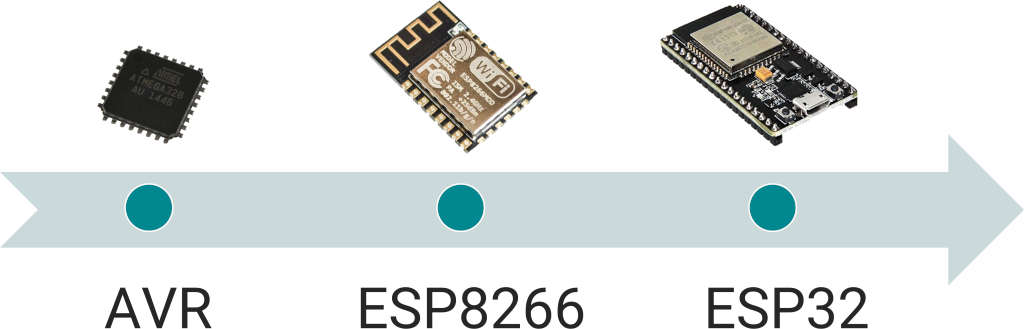
<p>During the past five years, we attended to the rise of 32-bit microcontrollers, first with the <a href="https://en.wikipedia.org/wiki/ESP8266">ESP8266</a>, then with the <a href="https://en.wikipedia.org/wiki/ESP32">ESP32</a>, and all the ARM-based MCUs.</p>

<p><img src="/images/2023/12/evolution-of-mcus.png" alt="Most popular microcontrollers over time" /></p>

<p>32-bit microcontrollers have much more memory but also a bigger runtime framework, so ArduinoJson now represents a small fraction of the executable. If we compare the parser example on the two versions of the Arduino UNO, we see that ArduinoJson 7 makes up about two-thirds of the executable on <a href="https://docs.arduino.cc/hardware/uno-rev3">R3</a> but only 7% on <a href="https://docs.arduino.cc/hardware/uno-r4-minima">R4</a>.</p>

<div class="row">
  <div class="col-sm-6">
    <script type="application/json" data-chart="">
{"type":"pie","data":{"labels":["Runtime","Program","ArduinoJson","Free"],"datasets":[{"label":"Dataset 1","data":[444,2830,6234,22748],"backgroundColor":["#9e846d","#00878f","#e47128","#ededed"]}]},"options":{"maintainAspectRatio":false,"plugins":{"legend":{"position":"bottom"},"title":{"display":true,"text":"JsonParserExample on Arduino UNO R3"}}}}
</script>
  </div>
  <div class="col-sm-6">
    <script type="application/json" data-chart="">
{"type":"pie","data":{"labels":["Runtime","Program","ArduinoJson","Free"],"datasets":[{"label":"Dataset 1","data":[53664,832,4236,203412],"backgroundColor":["#9e846d","#00878f","#e47128","#ededed"]}]},"options":{"maintainAspectRatio":false,"plugins":{"legend":{"position":"bottom"},"title":{"display":true,"text":"JsonParserExample on Arduino UNO R4"}}}}
</script>
  </div>
</div>

<p>Because the proportion is much smaller, the difference between ArduinoJson 6 and 7 is neglectable on 32-bit microcontrollers. For example, on <a href="https://docs.arduino.cc/hardware/uno-r4-minima">Arduino UNO R4 Minima</a>, the parser example only grew by 2.3%, and the generator example by 1.7%. As you can see, the size of the library is not so important anymore.</p>

<script type="application/json" data-chart="">
{"type":"line","data":{"labels":["v6.0","v6.1","v6.2","v6.3","v6.4","v6.5","v6.6","v6.7","v6.8","v6.9","v6.10","v6.11","v6.12","v6.13","v6.14","v6.15","v6.16","v6.17","v6.18","v6.19","v6.20","v6.21","v7.0"],"datasets":[{"label":"JsonParserExample","data":[57128,57080,58016,57888,58016,58224,59000,58240,58208,58160,58208,58208,58208,58224,58144,58144,58112,57128,57096,57384,57448,57432,58732],"borderColor":"#00878F"},{"label":"JsonGeneratorExample","data":[56544,56608,56736,56624,56752,56608,57216,56568,55896,55896,55896,55896,55896,55880,55880,55864,55864,55848,55728,56392,56488,56296,57260],"borderColor":"#62AEB2"},{"label":"MsgPackParser","data":[57344,57360,57360,57184,57520,57760,58496,57576,57528,57528,58120,58056,58056,58056,58056,58072,58104,57128,57240,57816,57800,57784,58892],"borderColor":"#E47128"}]},"options":{"maintainAspectRatio":false,"plugins":{"title":{"display":true,"text":"Examples size on Arduino UNO R4"}}}}
</script>

<p>ArduinoJson 7 can run on 8-bit microcontrollers, but if the memory is tight, it’s probably better if you stick with version 6.</p>

<h2 id="major-changes">Major changes</h2>

<p>ArduinoJson 7 includes stubs for every deprecated feature, so most existing programs should continue to work. The stubs produce informative warning messages that tell you how to upgrade the code. Of course, since your programs continue to work, you don’t have to upgrade right away, but you’ll see that the process is very straightforward. I already published <a href="/v7/how-to/upgrade-from-v6/">an article</a> explaining the changes in detail, so I’ll only give an overview here.</p>

<p>The biggest change concerns JsonDocument. ArduinoJson 7 exclusively relies on dynamic memory allocation, and you no longer need to specify the capacity upon creation.</p>

<p>Since we can no longer choose between stack and heap memory, I merged StaticJsonDocument and DynamicJsonDocument into a single JsonDocument class.</p>

<div class="language-diff highlighter-rouge"><div class="highlight"><pre class="highlight"><code><span class="gd">- StaticJsonDocument&lt;256&gt; doc;
</span><span class="gi">+ JsonDocument doc;
</span></code></pre></div></div>

<div class="language-diff highlighter-rouge"><div class="highlight"><pre class="highlight"><code><span class="gd">- DynamicJsonDocument doc(256);
</span><span class="gi">+ JsonDocument doc;
</span></code></pre></div></div>

<p>To maintain excellent performance, ArduinoJson 7 reduces heap allocations by allocating blocks of 1KB. <a href="/news/2020/08/01/version-6-16-0/">String deduplication</a> also reduces the number of allocations, and a short-string optimization will soon reduce it even more. The impact on <a href="https://cpp4arduino.com/2018/11/06/what-is-heap-fragmentation.html">heap fragmentation</a> should be very limited. In fact, the only function that should increase the fragmentation is <a href="/v7/api/json/deserializejson/"><code class="language-plaintext highlighter-rouge">deserializeJson()</code></a> because it needs to reallocate blocks for strings.</p>

<p>Because the capacity of the <a href="/v7/api/jsondocument/"><code class="language-plaintext highlighter-rouge">JsonDocument</code></a> is now elastic, several functions related to memory management became irrelevant: <code class="language-plaintext highlighter-rouge">JSON_ARRAY_SIZE()</code>, <code class="language-plaintext highlighter-rouge">JSON_OBJECT_SIZE()</code>, <a href="/v6/api/jsondocument/capacity/"><code class="language-plaintext highlighter-rouge">JsonDocument::capacity()</code></a>, <a href="/v6/api/jsondocument/memoryusage/"><code class="language-plaintext highlighter-rouge">JsonDocument::memoryUsage()</code></a>, and <a href="/v6/api/jsondocument/garbagecollect/"><code class="language-plaintext highlighter-rouge">JsonDocument::garbageCollect()</code></a>.</p>

<p><a href="/v7/api/jsondocument/shrinktofit/"><code class="language-plaintext highlighter-rouge">JsonDocument::shrinkToFit()</code></a>, which releases the over-allocated memory, is still available in ArduinoJson 7, but it is automatically called by <a href="/v7/api/json/deserializejson/"><code class="language-plaintext highlighter-rouge">deserializeJson()</code></a>, so you probably don’t need to call it anymore.</p>

<p>I changed how we customize the allocator: instead of passing a template parameter, you must pass a pointer to a polymorphic allocator. This change, inspired by <a href="https://en.cppreference.com/w/cpp/memory/polymorphic_allocator">std::pmr</a>, allows all JsonDocuments to be compatible with each other, regardless of the allocator. It also allowed me to get rid of the template class <a href="/v6/api/basicjsondocument/"><code class="language-plaintext highlighter-rouge">BasicJsonDocument</code></a>.</p>

<div class="language-diff highlighter-rouge"><div class="highlight"><pre class="highlight"><code><span class="gd">- BasicJsonDocument&lt;SpiRamAllocator&gt; doc(4096);
</span><span class="gi">+ SpiRamAllocator allocator;
+ JsonDocument doc(&amp;allocator);
</span></code></pre></div></div>

<p>I managed to keep all features of ArduinoJson 6, except one: <a href="/v6/api/jsonvariant/shallowcopy/"><code class="language-plaintext highlighter-rouge">shallowCopy()</code></a>. Indeed, due to significant changes in the library, a slot can no longer point to a different document. If your program calls <a href="/v6/api/jsonvariant/shallowcopy/"><code class="language-plaintext highlighter-rouge">shallowCopy()</code></a>, ArduinoJson 7 will do a deep copy instead, which could break your program, so watch out!</p>

<p>On a different topic, I took the opportunity to remove one of the library’s biggest warts. <a href="/v6/api/jsonvariant/createnestedarray/"><code class="language-plaintext highlighter-rouge">createNestedArray()</code></a> and <a href="/v6/api/jsonvariant/createnestedobject/"><code class="language-plaintext highlighter-rouge">createNestedObject()</code></a> are a legacy of ArduinoJson 4, and they don’t fit with the rest of the API. In ArduinoJson 7, I replaced them with <a href="/v7/api/jsonvariant/add/"><code class="language-plaintext highlighter-rouge">add&lt;T&gt;()</code></a> and <a href="(/v7/api/jsonvariant/to/)"><code class="language-plaintext highlighter-rouge">to&lt;T&gt;()</code></a>.</p>

<div class="language-diff highlighter-rouge"><div class="highlight"><pre class="highlight"><code>  // [["hello","world"]]
<span class="gd">- JsonArray arr2 = arr1.createNestedArray();
</span><span class="gi">+ JsonArray arr2 = arr1.add&lt;JsonArray&gt;();
</span>  arr2.add("hello");
  arr2.add("world");
</code></pre></div></div>

<div class="language-diff highlighter-rouge"><div class="highlight"><pre class="highlight"><code>  // [{"hello":"world"}]
<span class="gd">- JsonObject obj = arr.createNestedObject();
</span><span class="gi">+ JsonObject obj = arr.add&lt;JsonObject&gt;();
</span>  obj["hello"] = "world";
</code></pre></div></div>

<div class="language-diff highlighter-rouge"><div class="highlight"><pre class="highlight"><code>  // {"data":["hello", "world"]}
<span class="gd">- JsonArray arr = obj.createNestedArray("data");
</span><span class="gi">+ JsonArray arr = obj["data"].to&lt;JsonArray&gt;();
</span>  arr.add("hello");
  arr.add("world");
</code></pre></div></div>

<div class="language-diff highlighter-rouge"><div class="highlight"><pre class="highlight"><code>  // {"data":{"hello":"world"}}
<span class="gd">- JsonObject obj2 = obj1.createNestedObject("data");
</span><span class="gi">+ JsonObject obj2 = obj1["data"].to&lt;JsonObject&gt;();
</span>  obj2["hello"] = "world";
</code></pre></div></div>

<h2 id="other-changes">Other changes</h2>

<p>Now, let’s see less important changes that should only affect a minority of users and probably don’t require your attention.</p>

<p>The first is the removal of the zero-copy mode. In version 6, <a href="/v6/api/json/deserializejson/"><code class="language-plaintext highlighter-rouge">deserializeJson()</code></a> behaved differently depending on the input type. If the input was a <code class="language-plaintext highlighter-rouge">char*</code>, it used the zero-copy mode: instead of copying strings into the <a href="/v6/api/jsondocument/"><code class="language-plaintext highlighter-rouge">JsonDocument</code></a>, it kept them in the input buffer and stored pointers into the <a href="/v6/api/jsondocument/"><code class="language-plaintext highlighter-rouge">JsonDocument</code></a>. I was initially a big fan of this feature because it could save a lot of memory. Unfortunately, the zero-copy mode was misunderstood and caused many bugs, so I removed it from ArduinoJson 7. If your program relied on the zero-copy mode, you will see a significant increase in memory consumption after the upgrade.</p>

<p>Next, I fixed the weird behavior of <a href="/v7/api/json/serializejson/"><code class="language-plaintext highlighter-rouge">serializeJson()</code></a> with string classes. Indeed, in ArduinoJson 6, <a href="/v6/api/json/serializejson/"><code class="language-plaintext highlighter-rouge">serializeJson()</code></a> treated string objects (such as <a href="https://www.arduino.cc/reference/en/language/variables/data-types/stringobject/"><code>String</code></a> or <a href="https://en.cppreference.com/w/cpp/string/basic_string"><code>std::string</code></a>) as streams, so instead of replacing their content, it appended to the end. In ArduinoJson 7, <a href="/v7/api/json/serializejson/"><code class="language-plaintext highlighter-rouge">serializeJson()</code></a> overrides the content as one would expect. In theory, it is a breaking change, but I doubt it will break anything in practice.</p>

<p>Finally, I changed the string copy policy of the <a href="/v7/api/misc/serialized/"><code class="language-plaintext highlighter-rouge">serialized()</code></a> function. In ArduinoJson 6, raw strings used the same policy as regular strings: all types were stored by copy, except <code class="language-plaintext highlighter-rouge">const char*</code>, which were stored by pointer. In ArduinoJson 7, all raw strings are stored by copy.</p>

<h2 id="arduinojson-assistant">ArduinoJson Assistant</h2>

<p>I already published a new version of the <a href="/v7/assistant/">ArduinoJson Assistant</a>. As you’ll see, it is slightly different from what you are used to.</p>

<p>First of all, the raison d’être of the <a href="/v7/assistant/">Assistant</a> changed. Before, the main goal was to help you compute the right capacity for the <a href="/v7/api/jsondocument/"><code class="language-plaintext highlighter-rouge">JsonDocument</code></a>. Now, it is to validate that your <a href="/v7/api/jsondocument/"><code class="language-plaintext highlighter-rouge">JsonDocument</code></a> can fit in the RAM of your microcontroller.</p>

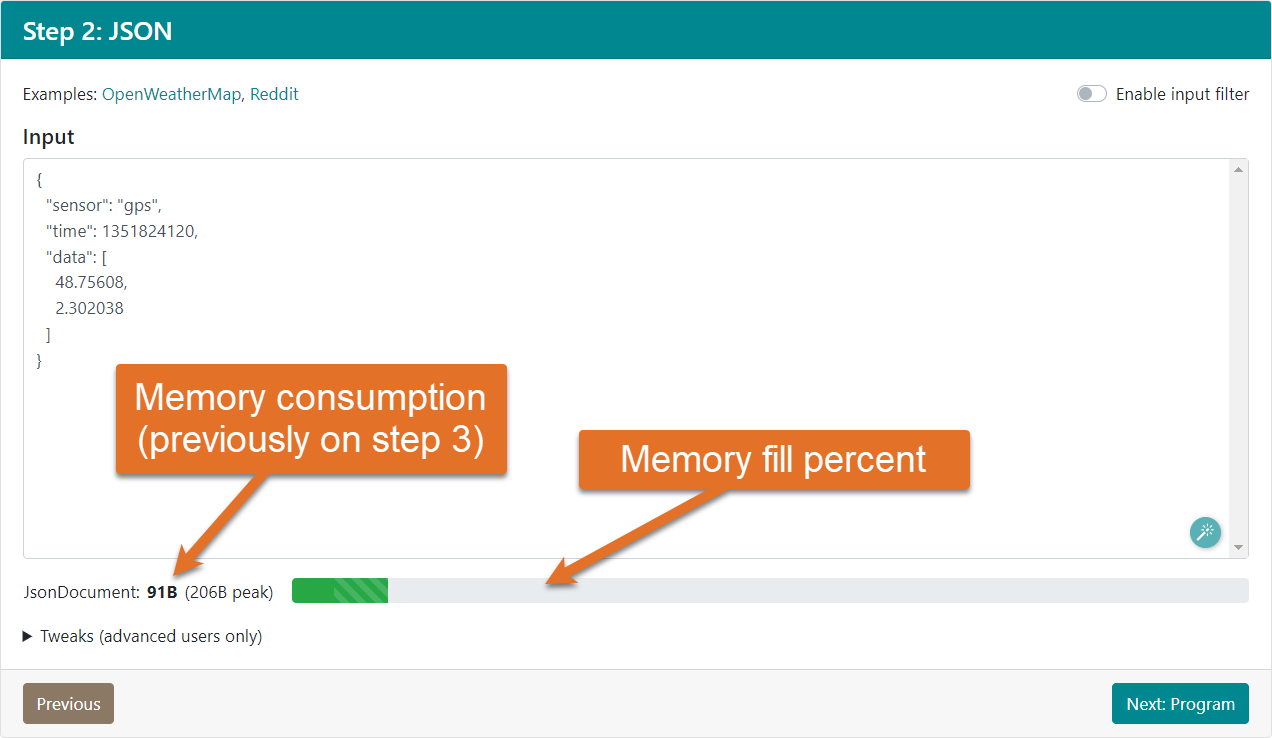
<p>Consequently, step 3, which showed how much RAM you should reserve for your <a href="/v7/api/jsondocument/"><code class="language-plaintext highlighter-rouge">JsonDocument</code></a>, was removed. The new <a href="/v7/assistant/">Assistant</a> still shows the memory consumption, but this was moved to step 2 and doesn’t give you as many details.</p>

<p><img src="/images/2023/12/arduinojson-assitant-v7-step2-memory.png" alt="ArduinoJson Assistant v7 step 2, highlighting the memory consumption" /></p>

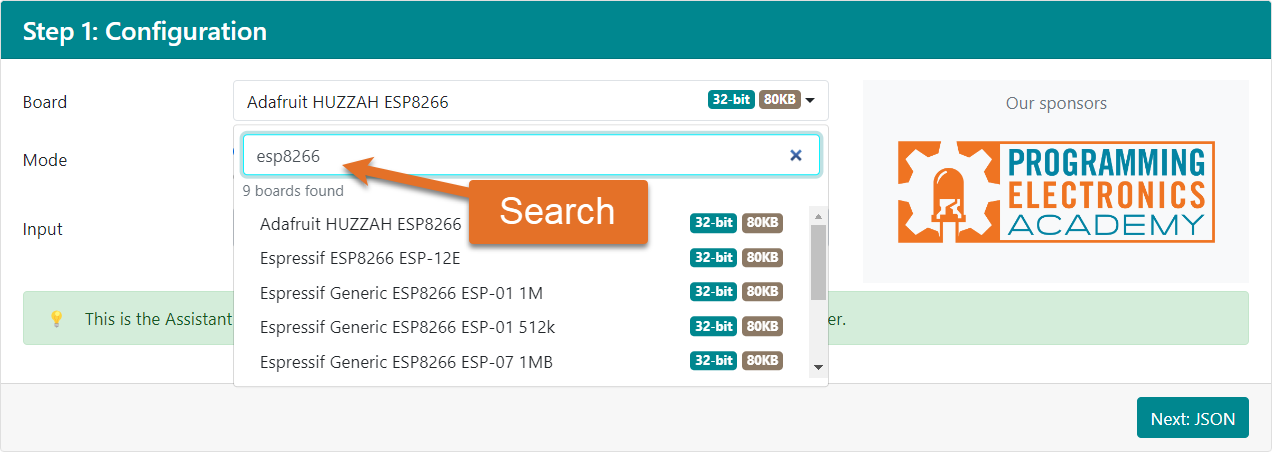
<p>In addition to showing the memory consumption, the new <a href="/v7/assistant/">Assistant</a> tells you what percentage of the RAM is used. Of course, this requires knowing the amount of memory available on your board, and that’s why the first step now asks you to enter the board instead of the processor architecture.</p>

<p><img src="/images/2023/12/arduinojson-assitant-v7-step1-board-search.png" alt="ArduinoJson Assistant v7 step 1, highlighting the board search" /></p>

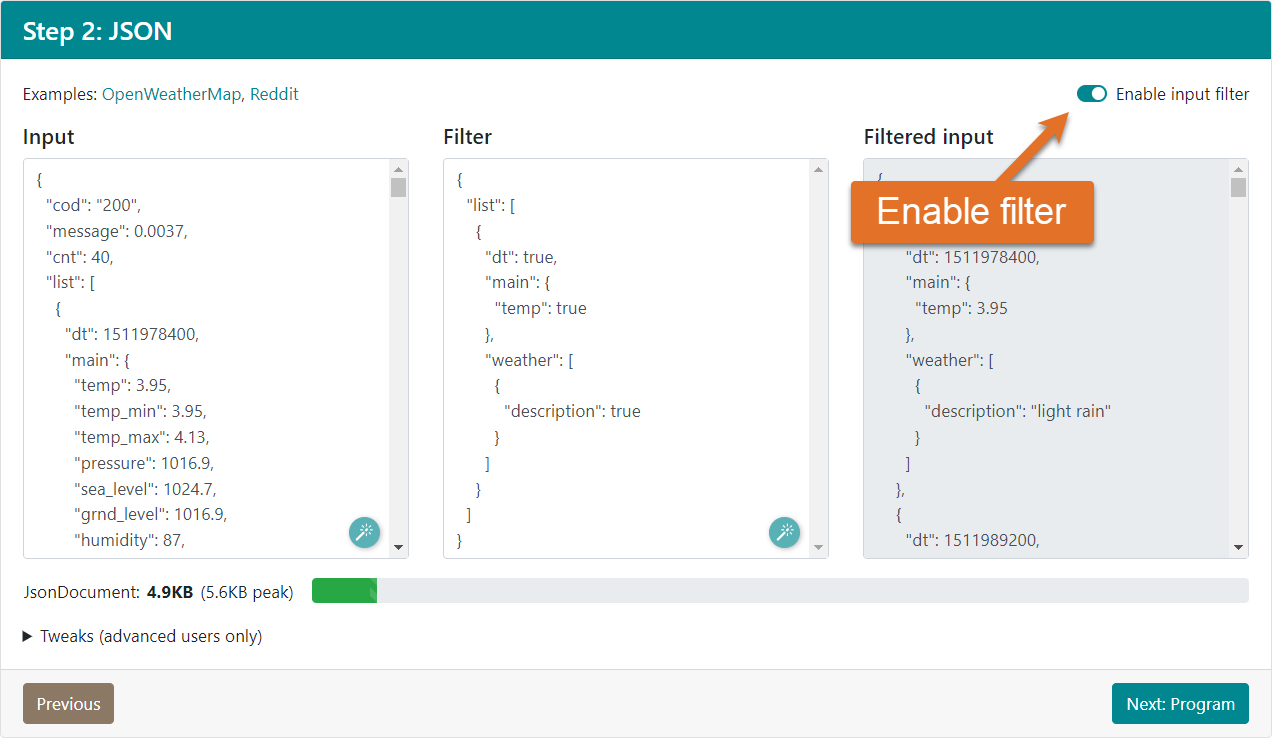
<p>The new <a href="/v7/assistant/">Assistant</a> still allows you to design a filter for <a href="/v7/api/json/deserializejson/"><code class="language-plaintext highlighter-rouge">deserializeJson()</code></a>, although this feature has changed a little. Instead of choosing “Deserialize and filter” in the first step, you must now check “Enable input filter” in the second step.</p>

<p><img src="/images/2023/12/arduinojson-assitant-v7-step2-filter.png" alt="ArduinoJson Assistant v7 step 2, highlighting the filter checkbox" /></p>

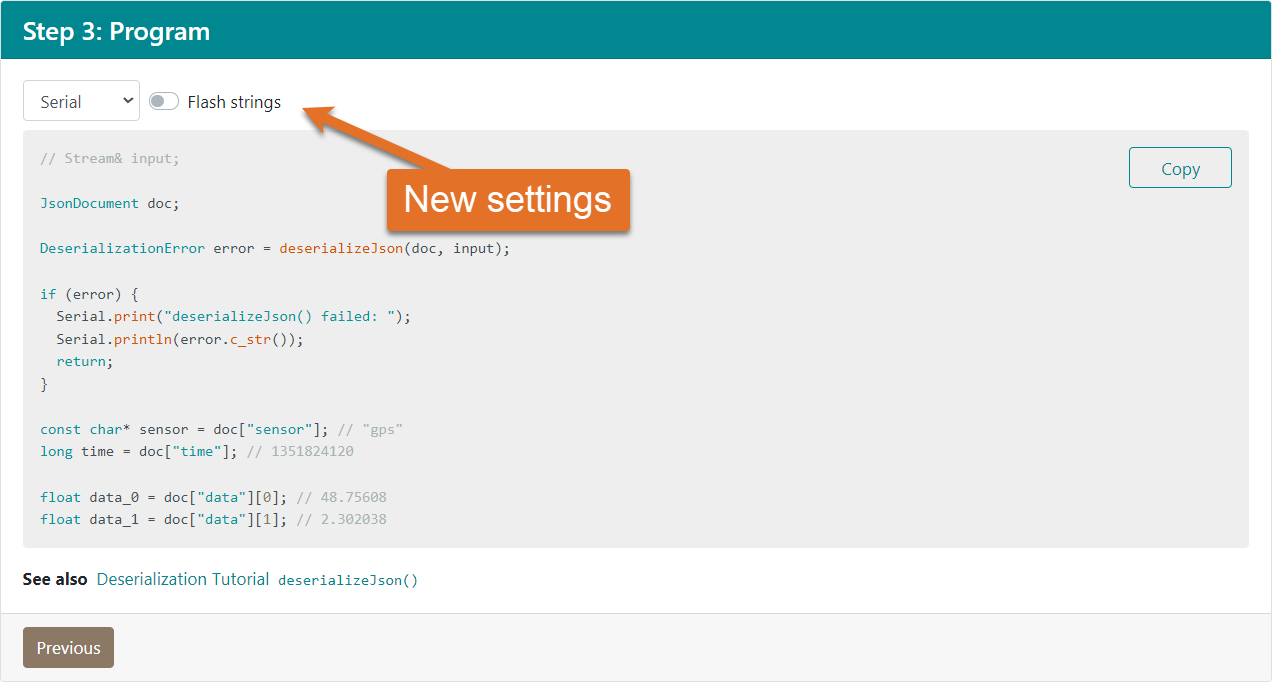
<p>The last step, which generates a sample program, remained roughly the same, except you can now customize the deserialization program. Two settings are available. The first chooses the output for the error messages: <a href="https://www.arduino.cc/reference/en/language/functions/communication/serial/"><code>Serial</code></a> or <a href="https://en.cppreference.com/w/cpp/io/cout"><code class="language-plaintext highlighter-rouge">std::cout</code></a>. The second turns Flash strings on or off.</p>

<p><img src="/images/2023/12/arduinojson-assitant-v7-step3-settings.png" alt="ArduinoJson Assistant v7 step 3, highlighting the new settings" /></p>

<h2 id="arduinojsonorg">arduinojson.org</h2>

<p>As you probably already saw, all the documentation for ArduinoJson 7 is already there. You can select the version on the navigation bar at the top of the screen.</p>

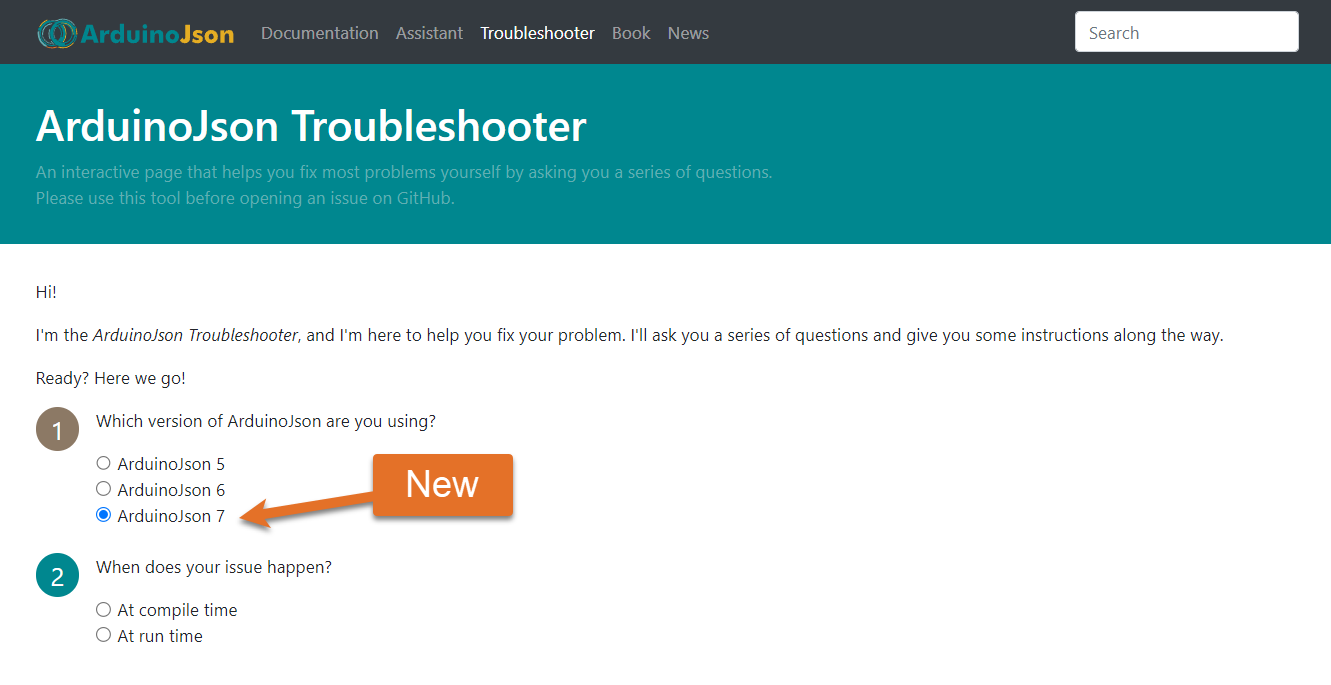
<p>I also updated the <a href="/troubleshooter/">Troubleshooter</a> to support ArduinoJson 7. You’ll see that it now starts by asking which version you use, and I even included ArduinoJson 5 for completeness.</p>

<p><img src="/images/2023/12/arduinojson-troubleshooter-version.png" alt="ArduinoJson Troubleshooter v7, highlighting the version selection" /></p>

<p>If you encounter any issue with the library, please try to self-diagnose your problem with the <a href="/troubleshooter/">ArduinoJson Troubleshooter</a>. If it is unable to help, please open an issue on GitHub. Remember to include the <a href="/troubleshooter/">Troubleshooter</a> report in the issue description. The report gives me the context and tells me what you already tried. It also allows me to continue improving the <a href="/troubleshooter/">Troubleshooter</a> by adding more choices at the right locations.</p>

<h2 id="mastering-arduinojson">Mastering ArduinoJson</h2>

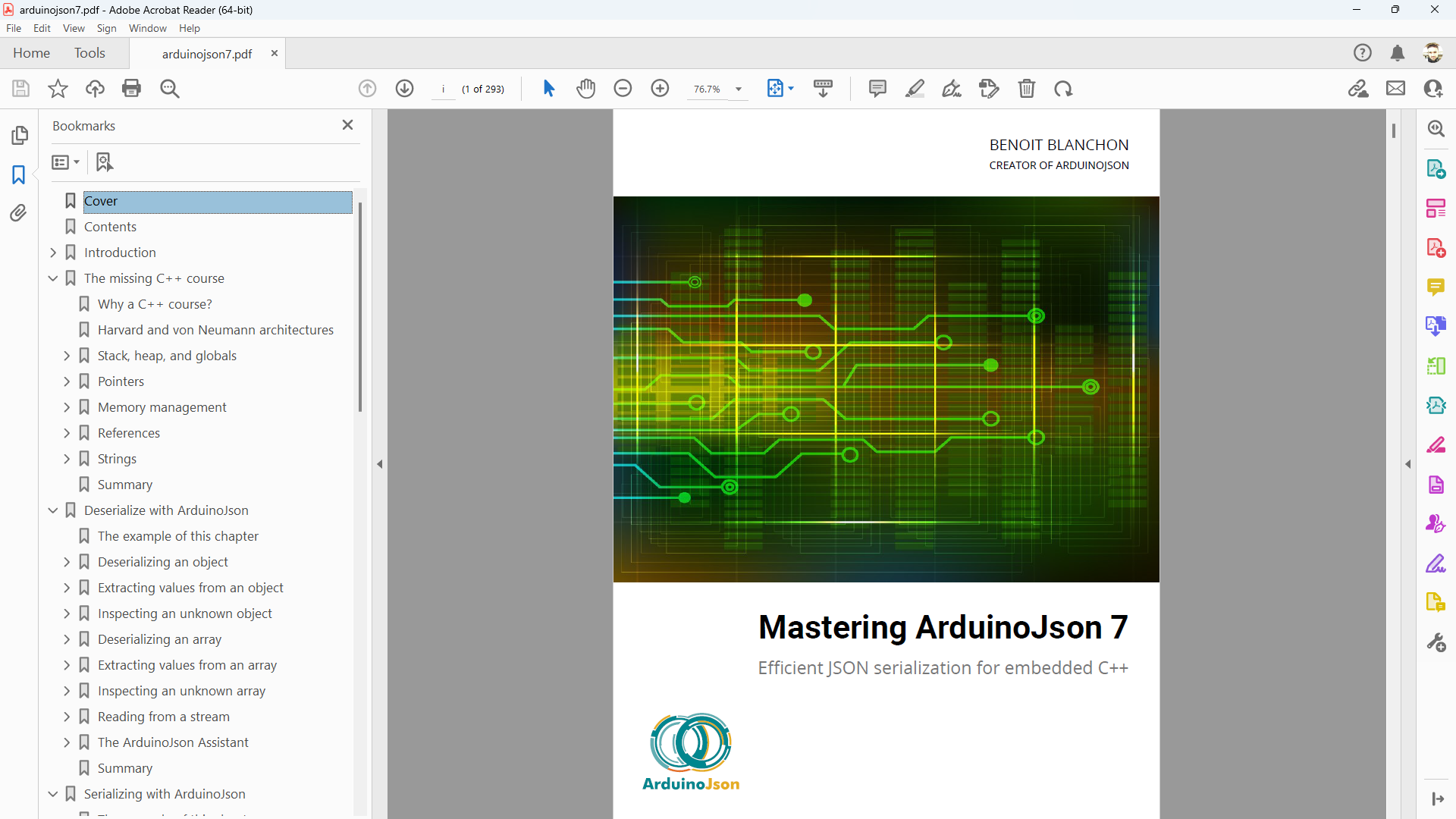
<p>I published a new edition of my book <a href="/book/">Mastering ArduinoJson</a> for version 7.</p>

<p><img src="/images/2023/12/mastering-arduinojson-7-acrobat-reader.png" alt="Mastering ArduinoJson 7 in Acrobat Reader" /></p>

<p>The overall structure remained the same:</p>

<ul>
  <li>Chapter 1 briefly introduces ArduinoJson and what you can do with it. When updating the manuscript, I was amazed by the number of Web APIs that had disappeared since the last edition. I included the list so that you realize how important it is to choose your service provider wisely.</li>
  <li>Chapter 2 teaches elementary C++ aspects that most Arduino users ignore. It’s called “The missing C++ course” because it covers what is usually omitted by other courses.</li>
  <li>Chapters 3 and 4 are the deserialization and serialization tutorials. They are available for free on arduinojson.org.</li>
  <li>Chapter 5 covers advanced topics, such as filtering, deserialization in chunks, JSON streaming, allocators, readers, writers, converters, and other valuable techniques.</li>
  <li>Chapter 6 explains how the library works and how to navigate the code. I rewrote this chapter from scratch, and this version is radically different from the previous one.</li>
  <li>Chapter 7 is a troubleshooting guide; it shows how things can go wrong and how to prevent bugs. Most of this chapter applies to any C++ program, whether it uses ArduinoJson or not.</li>
  <li>Chapter 8 contains five case studies showing how to use ArduinoJson in different scenarios.</li>
</ul>

<p>I invite you to purchase the book directly at <a href="/book/">arduinojson.org/book</a>.
Not only will you learn essential things, but you’ll also support my work, allowing me to continue investing a crazy amount of time in improving the library and helping the community.</p>

<h2 id="future-plans">Future plans</h2>

<p>As you can imagine, this new release has required tremendous work, so I might take a break before adding new features.</p>

<p>If you’ve been following me, you know that I rarely announce what’s coming in the next version. 
As usual, I won’t make any promises about what’s coming up, but I can tell you what’s on my mind at the moment.</p>

<ol>
  <li>Implement short-string optimization, which would continue to reduce the number of allocations.</li>
  <li>Rewrite the parser in a non-recursive way, which would allow me to get rid of <a href="/v7/api/json/deserializejson/#nesting-limit"><code class="language-plaintext highlighter-rouge">DeserializationOption::NestingLimit</code></a> and <a href="/v7/api/misc/deserializationerror/#deserializationerrortoodeep"><code class="language-plaintext highlighter-rouge">DeserializationError::TooDeep</code></a>.</li>
  <li>Add a new parser for JSON5, which would eliminate the need for <a href="/v7/config/enable_comments/">ARDUINOJSON_ENABLE_COMMENTS</a>.</li>
  <li>Refactor the parsers to support incremental data, which would be fantastic for scenarios where you receive the JSON document piece by piece, like with <a href="https://github.com/me-no-dev/ESPAsyncWebServer">ESPAsyncWebServer</a>.</li>
</ol>

<p>Of course, I’m not making any commitments since my priorities might change. All I can promise is that I’ll continue working on ArduinoJson as much as my time allows.</p>

<h2 id="see-also">See also</h2>

<ul>
  <li><a href="/v7/how-to/upgrade-from-v6/">How to upgrade your code from ArduinoJson 6 to 7</a></li>
  <li><a href="/v7/how-to/upgrade-from-v5/">How to upgrade your code from ArduinoJson 5 to 7</a></li>
</ul>]]></content><author><name>BenoitBlanchon</name></author><summary type="html"><![CDATA[ArduinoJson 7 redefines the memory allocation strategy to adapt to the new microcontroller landscape.]]></summary><media:thumbnail xmlns:media="http://search.yahoo.com/mrss/" url="https://arduinojson.org/images/2023/12/arduinojson-7-0-0-thumb.png" /><media:content medium="image" url="https://arduinojson.org/images/2023/12/arduinojson-7-0-0-thumb.png" xmlns:media="http://search.yahoo.com/mrss/" /></entry><entry><title type="html">ArduinoJson 6.21: dropping support for C++03</title><link href="https://arduinojson.org/news/2023/03/14/arduinojson-6-21-0/" rel="alternate" type="text/html" title="ArduinoJson 6.21: dropping support for C++03" /><published>2023-03-14T00:00:00+00:00</published><updated>2023-03-14T00:00:00+00:00</updated><id>https://arduinojson.org/news/2023/03/14/arduinojson-6-21-0</id><content type="html" xml:base="https://arduinojson.org/news/2023/03/14/arduinojson-6-21-0/"><![CDATA[<p>As I announced in the previous post, I’m removing support for C++03/C++98 in ArduinoJson. Moving forward, you’ll need a C++11-capable compiler, which you probably already have.</p>

<h2 id="why-drop-support-for-c03">Why drop support for C++03?</h2>

<p>I kept compatibility with C++03 much longer than most other C++ libraries because I wanted ArduinoJson to work with old compilers. As you probably discovered, hardware manufacturers often take a very long time to upgrade the compilers bundled in their development kits (when they ever do).</p>

<p>It doesn’t seem like much, but keeping compatibility with C++03 was challenging because it forced me to use antiquated techniques, such as the <a href="https://en.wikibooks.org/wiki/More_C%2B%2B_Idioms/Safe_bool">safe-bool idiom</a>. I was eager to move to C++11 because then I could simplify many areas of the library and trigger new optimizations.</p>

<p>I wondered how many ArduinoJson users were still relying on the C++03 compatibility, so in November 2022, I started a <a href="https://github.com/bblanchon/ArduinoJson/discussions/1820">survey on GitHub</a>. I placed a prominent banner on arduinojson.org saying I was about to remove support for C++03.</p>

<p>Of the estimated 200k people exposed to this banner, only 107 responded. 86% were in favor of this change, and 14% were against it. After discussing with some of them, it was clear that they voted against the change because they didn’t even know what C++11 was and were afraid that it could break their code.</p>

<p><img src="/images/2023/03/arduinojson-cpp03-survey.png" alt="The results of the survey" /></p>

<p>I concluded that out of this sample of 200k people, none were concerned about this change; otherwise, one would have raised their voice. In other words, my obsession with staying compatible with C++03 has become irrelevant, and it was time to turn the page.</p>

<h2 id="removal-of-arduinojson_namespace">Removal of <code class="language-plaintext highlighter-rouge">ARDUINOJSON_NAMESPACE</code></h2>

<p>Thanks to the <a href="https://en.cppreference.com/w/cpp/language/namespace#Inline_namespaces">inline namespace</a> feature, I could eliminate the <code class="language-plaintext highlighter-rouge">ARDUINOJSON_NAMESPACE</code> macro and all the ridiculous <code class="language-plaintext highlighter-rouge">using</code>s and <code class="language-plaintext highlighter-rouge">typedef</code>s in <code class="language-plaintext highlighter-rouge">ArduinoJson.hpp</code>.</p>

<p>This change should only affect you if you define <a href="/news/2021/05/04/version-6-18-0/">custom converter classes</a>. If that’s your case, you must substitute <code class="language-plaintext highlighter-rouge">ARDUINOJSON_NAMESPACE</code> with <code class="language-plaintext highlighter-rouge">ArduinoJson</code>.</p>

<p>A positive side-effect of this change is that the Arduino IDE now shows the correct documentation for the classes and functions of ArduinoJson.</p>

<p><img src="/images/2023/03/arduino-ide-showing-documentation-for-deserializejson.png" alt="The Arduino IDE showing the documentation for deserializeJson()" /></p>

<h2 id="generic-string-support">Generic string support</h2>

<p>Thanks to the <a href="https://en.cppreference.com/w/cpp/language/decltype"><code class="language-plaintext highlighter-rouge">decltype</code> operator</a>, I could finally implement generic support for string objects. ArduinoJson now treats as a string any class that supports <code class="language-plaintext highlighter-rouge">data()</code>/<code class="language-plaintext highlighter-rouge">size()</code> (like <a href="https://en.cppreference.com/w/cpp/string/basic_string"><code>std::string</code></a> and <a href="https://en.cppreference.com/w/cpp/string/basic_string_view"><code>std::string_view</code></a>), or <code class="language-plaintext highlighter-rouge">c_str()</code>/<code class="language-plaintext highlighter-rouge">length()</code> (like <a href="https://www.arduino.cc/reference/en/language/variables/data-types/stringobject/"><code>String</code></a>), which means that other string classes, such as <a href="https://www.etlcpp.com/string.html"><code class="language-plaintext highlighter-rouge">etl::string</code></a> are now supported out-of-the-box.</p>

<h2 id="evolution-of-code-size">Evolution of code size</h2>

<p>C++11 allowed me to slightly reduce the size of the library, as you can see in the following graphs.</p>

<script type="application/json" data-chart="">
{
  "type": "line",
  "data": {
    "labels": ["v6.10", "v6.11", "v6.12", "v6.13", "v6.14", "v6.15", "v6.16", "v6.17", "v6.18", "v6.19", "v6.20", "v6.21"],
    "datasets": [
      {
        "label": "JsonParserExample",
        "data": [6978, 7038, 7038, 7050, 6968, 6830, 6924, 6718, 6714, 6740, 6784, 6762],
        "borderColor": "#00878F"
      },
      {
        "label": "JsonGeneratorExample",
        "data": [5772, 5756, 5756, 5752, 5752, 5738, 5738, 5558, 5456, 5560, 5588, 5574],
        "borderColor": "#62AEB2"
      },
      {
        "label": "MsgPackParser",
        "data": [7138, 7122, 7122, 7176, 7176, 7258, 7126, 6958, 7110, 7142, 7110, 7088],
        "borderColor": "#E47128"
      },
      {
        "label": "StringExample",
        "data": [10072, 10174, 10174, 10538, 11120, 11042, 11264, 11032, 11102, 10968, 10728, 10686],
        "borderColor": "#8C7965"
      },
      {
        "label": "ProgmemExample",
        "data": [5964, 6026, 6026, 6092, 6010, 6038, 6422, 6306, 6276, 6312, 6512, 6480],
        "borderColor": "#E5AD24"
      }
    ]
  },
  "options": {
    "maintainAspectRatio": false,
    "plugins": {
      "title": {
        "display": true,
        "text": "Examples size on AVR"
      }
    }
  }
}
</script>

<script type="application/json" data-chart="">
{
  "type": "line",
  "data": {
    "labels": ["v6.10", "v6.11", "v6.12", "v6.13", "v6.14", "v6.15", "v6.16", "v6.17", "v6.18", "v6.19", "v6.20", "v6.21"],
    "datasets": [
      {
        "label": "JsonParserExample",
        "data": [271241, 271257, 271257, 271337, 271209, 271001, 271097, 270009, 269961, 270345, 270457, 270349],
        "borderColor": "#00878F"
      },
      {
        "label": "JsonGeneratorExample",
        "data": [267933, 267981, 267981, 267965, 267965, 267937, 267937, 267937, 267885, 268497, 268689, 268489],
        "borderColor": "#62AEB2"
      },
      {
        "label": "MsgPackParser",
        "data": [271225, 271209, 271209, 271209, 271209, 271225, 271065, 270057, 270121, 270777, 270809, 270681],
        "borderColor": "#E47128"
      },
      {
        "label": "StringExample",
        "data": [266969, 267257, 267257, 267353, 267545, 267385, 267625, 267577, 267577, 268585, 268633, 268309],
        "borderColor": "#8C7965"
      },
      {
        "label": "ProgmemExample",
        "data": [263757, 264013, 264013, 263853, 263725, 263645, 263949, 263901, 263885, 264557, 264717, 264605],
        "borderColor": "#E5AD24"
      }
    ]
  },
  "options": {
    "maintainAspectRatio": false,
    "plugins": {
      "title": {
        "display": true,
        "text": "Examples size on ESP8266"
      }
    }
  }
}
</script>

<h2 id="conclusion">Conclusion</h2>

<p>As I said, I don’t expect anyone to be affected negatively. If you cannot switch to C++11, you’ll have to stick with ArduinoJson 6.20.x. I’ll continue fixing bugs on this branch as long as I can.</p>

<p>I initially planned to add more features to ArduinoJson 6, but I finally decided to start working on ArduinoJson 7. Don’t get too excited, though, as it will take a long time before it gets ready for production. Remember that ArduinoJson 6 stayed in the “beta” stage for over eight months, and version 7 will likely take as much time to mature.</p>]]></content><author><name>BenoitBlanchon</name></author><summary type="html"><![CDATA[As I announced in the previous post, I'm removing support for C++03/C++98 in ArduinoJson. Moving forward, you'll need a C++11-capable compiler, which you probably already have.]]></summary><media:thumbnail xmlns:media="http://search.yahoo.com/mrss/" url="https://arduinojson.org/images/2023/03/arduinojson-6-21-0-thumb.png" /><media:content medium="image" url="https://arduinojson.org/images/2023/03/arduinojson-6-21-0-thumb.png" xmlns:media="http://search.yahoo.com/mrss/" /></entry><entry><title type="html">ArduinoJson 6.20: shallow copy and documentation</title><link href="https://arduinojson.org/news/2022/12/26/arduinojson-6-20-0/" rel="alternate" type="text/html" title="ArduinoJson 6.20: shallow copy and documentation" /><published>2022-12-26T00:00:00+00:00</published><updated>2022-12-26T00:00:00+00:00</updated><id>https://arduinojson.org/news/2022/12/26/arduinojson-6-20-0</id><content type="html" xml:base="https://arduinojson.org/news/2022/12/26/arduinojson-6-20-0/"><![CDATA[<p>ArduinoJson 6.20 is finally out!
This long-awaited release contains many changes on the inside but not so much on the outside.
Indeed, in the year that passed since <a href="/news/2022/01/08/arduinojson-6-19-0/">6.19.0</a>, I regularly committed changes to the code, but I didn’t publish a new release because I wanted to complete the internal cleanup before doing so.</p>

<p>In this article, I’ll review all the visible changes that 6.20 brings:</p>

<ol>
  <li>a new “shallow copy” feature for <a href="/v6/api/jsonvariant/"><code class="language-plaintext highlighter-rouge">JsonVariant</code></a>,</li>
  <li>a slightly stricter JSON parser,</li>
  <li>documentation for most public symbols,</li>
  <li>the rename of internal symbols,</li>
  <li>the removal of many undocumented functions,</li>
  <li>a new overload of <a href="/v6/api/jsonarray/add/"><code class="language-plaintext highlighter-rouge">JsonArray::add()</code></a>,</li>
  <li>the removal of support for naked <code class="language-plaintext highlighter-rouge">char</code>.</li>
</ol>

<h2 id="shallow-copy">Shallow copy</h2>

<p>Sometimes, you compose a <a href="/v6/api/jsondocument/"><code class="language-plaintext highlighter-rouge">JsonDocument</code></a> from multiple other <a href="/v6/api/jsondocument/"><code class="language-plaintext highlighter-rouge">JsonDocument</code></a>s.
For example, you could have a general configuration object you construct by including the configuration from several modules.</p>

<p>Up till now, we had to copy all the data into a huge <a href="/v6/api/jsondocument/"><code class="language-plaintext highlighter-rouge">JsonDocument</code></a>, like so:</p>

<div class="language-c++ highlighter-rouge"><div class="highlight"><pre class="highlight"><code><span class="n">DynamicJsonDocument</span> <span class="n">gpsConfig</span> <span class="o">=</span> <span class="n">getGpsConfig</span><span class="p">();</span>
<span class="n">DynamicJsonDocument</span> <span class="n">gpioConfig</span> <span class="o">=</span> <span class="n">getGpioConfig</span><span class="p">();</span>
<span class="n">DynamicJsonDocument</span> <span class="nf">config</span><span class="p">(</span><span class="mi">4096</span><span class="p">);</span>
<span class="n">config</span><span class="p">[</span><span class="s">"gps"</span><span class="p">]</span> <span class="o">=</span> <span class="n">gpsConfig</span><span class="p">;</span>
<span class="n">config</span><span class="p">[</span><span class="s">"gpio"</span><span class="p">]</span> <span class="o">=</span> <span class="n">gpioConfig</span><span class="p">;</span>
<span class="n">serializeJson</span><span class="p">(</span><span class="n">config</span><span class="p">,</span> <span class="n">file</span><span class="p">);</span>
</code></pre></div></div>

<p>Now, we can use <a href="/v6/api/jsonvariant/shallowcopy/"><code class="language-plaintext highlighter-rouge">JsonVariant::shallowCopy()</code></a> to include the data without making a copy:</p>

<div class="language-c++ highlighter-rouge"><div class="highlight"><pre class="highlight"><code><span class="n">DynamicJsonDocument</span> <span class="n">gpsConfig</span> <span class="o">=</span> <span class="n">getGpsConfig</span><span class="p">();</span>
<span class="n">DynamicJsonDocument</span> <span class="n">gpioConfig</span> <span class="o">=</span> <span class="n">getGpioConfig</span><span class="p">();</span>
<span class="n">StaticJsonDocument</span><span class="o">&lt;</span><span class="mi">128</span><span class="o">&gt;</span> <span class="n">config</span><span class="p">;</span>
<span class="n">config</span><span class="p">[</span><span class="s">"gps"</span><span class="p">].</span><span class="n">shallowCopy</span><span class="p">(</span><span class="n">gpsConfig</span><span class="p">);</span>
<span class="n">config</span><span class="p">[</span><span class="s">"gpio"</span><span class="p">].</span><span class="n">shallowCopy</span><span class="p">(</span><span class="n">gpioConfig</span><span class="p">);</span>
<span class="n">serializeJson</span><span class="p">(</span><span class="n">config</span><span class="p">,</span> <span class="n">file</span><span class="p">);</span>
</code></pre></div></div>

<p>By avoiding the deep copy, this feature reduces the size of the final <a href="/v6/api/jsondocument/"><code class="language-plaintext highlighter-rouge">JsonDocument</code></a> and improves performance.
Of course, since the new <a href="/v6/api/jsondocument/"><code class="language-plaintext highlighter-rouge">JsonDocument</code></a> refers to the nested ones, you must ensure they remain in memory for the whole operation.</p>

<h2 id="stricter-json-parser">Stricter JSON parser</h2>

<p>ArduinoJson’s JSON parser has always favored code size over strict conformance.
It never rejects a valid JSON document, but it may accept an invalid JSON document in some cases.</p>

<p>For example, up till now, the parser avoided string comparisons for the <code class="language-plaintext highlighter-rouge">true</code>, <code class="language-plaintext highlighter-rouge">false</code>, and <code class="language-plaintext highlighter-rouge">null</code>.
Instead, it just looked at the first character and the string length.
In other words, it accepted any four-letter word starting with <code class="language-plaintext highlighter-rouge">n</code>, like <code class="language-plaintext highlighter-rouge">none</code> or <code class="language-plaintext highlighter-rouge">nope</code>, for <code class="language-plaintext highlighter-rouge">null</code>.</p>

<p>Unfortunately, the optimization made the parser confuse error messages with valid JSON documents.
For example, a user reported that <code class="language-plaintext highlighter-rouge">deserializeJson(doc, "force esp exception")</code> returned <code class="language-plaintext highlighter-rouge">Ok</code>.
This is a small problem, but the diagnosis can take some time; that’s why I decided to remove this optimization.</p>

<p>Now, ArduinoJson 6.20 checks the entire word for <code class="language-plaintext highlighter-rouge">null</code>, <code class="language-plaintext highlighter-rouge">false</code>, and <code class="language-plaintext highlighter-rouge">true</code>.
There remain some cases where the parser will overlook errors in the input; for example, it will not report incorrect UTF-16 surrogates pairs.</p>

<h2 id="documentation">Documentation</h2>

<p>I added a short comment on the top of almost every public symbol of the library.
These comments should appear in your IDE when you hover a symbol.</p>

<p><img src="/images/2022/12/arduinojson-documentation-visualstudio.png" alt="JsonObject's documentation on Visual Studio" />
<img src="/images/2022/12/arduinojson-documentation-vscode.png" alt="JsonObject's documentation on Visual Studio Code" /></p>

<p>As you can see, I didn’t use any markup in the comments because I couldn’t not find something that worked correctly in both Visual Studio and Visual Studio Code.
As a result, each comment is a one- or two-line description followed by a link to the full documentation.</p>

<p>Unfortunately, the Arduino IDE is not showing symbol comments, but hopefully, it will do in the future.</p>

<h2 id="massive-internal-renames">Massive internal renames</h2>

<p>The internal classes in ArduinoJson used to have different names. For example, the implementation of <a href="/v6/api/jsonarray/"><code class="language-plaintext highlighter-rouge">JsonArray</code></a> was <code class="language-plaintext highlighter-rouge">ArrayRef</code>, and the one of <a href="/v6/api/jsonarrayconst/"><code class="language-plaintext highlighter-rouge">JsonArrayConst</code></a> was <code class="language-plaintext highlighter-rouge">ArrayConstRef</code>.</p>

<p>While I liked the flexibility and expressiveness these names gave me, I now think it was a bad idea.
The first issue is that the internal names frequently appear in the error messages, which confuses users.
The second issue is that I had to use <code class="language-plaintext highlighter-rouge">typedef</code> to rename the symbols, and Visual Studio Code refused to show the documentation for those.</p>

<p>That is why I decided to rename every internal symbol to match the public ones.</p>

<h2 id="hide-internals">Hide internals</h2>

<p>Another issue we used to have with IDEs is that they suggested functions reserved for internal use, and some users ended up using them as if they were part of the official API.
For example, I saw some of you use functions like <code class="language-plaintext highlighter-rouge">getMember()</code> or <code class="language-plaintext highlighter-rouge">getOrCreateMember()</code> even though they were supposed to be internal to the library.</p>

<p>As part of this “developer experience” package, I decided to hide as much internal stuff as possible.
Of course, this is a breaking change, but that’s what happens when one uses undocumented APIs.
Fortunately, you can easily recreate the behavior of internal functions with the public API.</p>

<p>Here is how you can update you code:</p>

<div class="language-c++ highlighter-rouge"><div class="highlight"><pre class="highlight"><code><span class="c1">// before</span>
<span class="n">JsonVariant</span> <span class="n">a</span> <span class="o">=</span> <span class="n">variant</span><span class="p">.</span><span class="n">getElement</span><span class="p">(</span><span class="n">idx</span><span class="p">);</span>
<span class="n">JsonVariant</span> <span class="n">b</span> <span class="o">=</span> <span class="n">variant</span><span class="p">.</span><span class="n">getOrAddElement</span><span class="p">(</span><span class="n">idx</span><span class="p">);</span>
<span class="n">JsonVariant</span> <span class="n">c</span> <span class="o">=</span> <span class="n">variant</span><span class="p">.</span><span class="n">getMember</span><span class="p">(</span><span class="n">key</span><span class="p">);</span>
<span class="n">JsonVariant</span> <span class="n">d</span> <span class="o">=</span> <span class="n">variant</span><span class="p">.</span><span class="n">getOrAddMember</span><span class="p">(</span><span class="n">key</span><span class="p">);</span>

<span class="c1">// after</span>
<span class="n">JsonVariant</span> <span class="n">a</span> <span class="o">=</span> <span class="n">variant</span><span class="p">[</span><span class="n">idx</span><span class="p">];</span>
<span class="n">JsonVariant</span> <span class="n">b</span> <span class="o">=</span> <span class="n">idx</span> <span class="o">&lt;</span> <span class="n">variant</span><span class="p">.</span><span class="n">size</span><span class="p">()</span> <span class="o">?</span> <span class="n">variant</span><span class="p">[</span><span class="n">idx</span><span class="p">]</span> <span class="o">:</span> <span class="n">variant</span><span class="p">[</span><span class="n">idx</span><span class="p">].</span><span class="n">to</span><span class="o">&lt;</span><span class="n">JsonVariant</span><span class="o">&gt;</span><span class="p">();</span>
<span class="n">JsonVariant</span> <span class="n">c</span> <span class="o">=</span> <span class="n">variant</span><span class="p">[</span><span class="n">key</span><span class="p">];</span>
<span class="n">JsonVariant</span> <span class="n">d</span> <span class="o">=</span> <span class="n">variant</span><span class="p">.</span><span class="n">containsKey</span><span class="p">(</span><span class="n">key</span><span class="p">)</span> <span class="o">?</span> <span class="n">variant</span><span class="p">[</span><span class="n">key</span><span class="p">]</span> <span class="o">:</span> <span class="n">variant</span><span class="p">[</span><span class="n">key</span><span class="p">].</span><span class="n">to</span><span class="o">&lt;</span><span class="n">JsonVariant</span><span class="o">&gt;</span><span class="p">();</span>
</code></pre></div></div>

<h2 id="new-overload-of-jsonarrayadd">New overload of <code class="language-plaintext highlighter-rouge">JsonArray::add()</code></h2>

<p>In all these removed internal functions, <code class="language-plaintext highlighter-rouge">addElement()</code> couldn’t be easily recreated with the public ones, so I decided to rename it and make it part of the public API. It’s now available as the parameterless overload of <a href="/v6/api/jsonarray/add/"><code class="language-plaintext highlighter-rouge">JsonArray::add()</code></a>, <a href="/v6/api/jsondocument/add/"><code class="language-plaintext highlighter-rouge">JsonDocument::add()</code></a>, and <a href="/v6/api/jsonvariant/add/"><code class="language-plaintext highlighter-rouge">JsonVariant::add()</code></a>.</p>

<p>This function appends an empty element to an array and returns a reference to the new element. I don’t expect this function to be very popular, but I call it in many places in the library, so I figured I might as well make it available to everyone.</p>

<p>Fun fact: this undocumented function used to be named <a href="/v6/api/jsonarray/add/"><code class="language-plaintext highlighter-rouge">JsonArray::add()</code></a> three years ago when ArduinoJson 6 was still in <em>beta</em>. I literally went full circle on that one.</p>

<h2 id="removed-support-for-char-and-char">Removed support for <code class="language-plaintext highlighter-rouge">char</code> and <code class="language-plaintext highlighter-rouge">char*</code></h2>

<p>Support for naked <code class="language-plaintext highlighter-rouge">char</code>s was marked deprecated since <a href="/news/2021/05/04/version-6-18-0/">ArduinoJson 6.18</a> because it caused issues with <code class="language-plaintext highlighter-rouge">std::string</code>.
After a year and a half, I removed this deprecated code.</p>

<p>This is a breaking change: you must replace <code class="language-plaintext highlighter-rouge">char</code> with either <code class="language-plaintext highlighter-rouge">signed char</code>, <code class="language-plaintext highlighter-rouge">unsigned char</code>, or any other integer type. 
Similarly, you must replace <code class="language-plaintext highlighter-rouge">char*</code> with <code class="language-plaintext highlighter-rouge">const char*</code>.</p>

<p>For example:</p>

<div class="language-c++ highlighter-rouge"><div class="highlight"><pre class="highlight"><code><span class="c1">// before</span>
<span class="kt">char</span> <span class="n">age</span> <span class="o">=</span> <span class="n">doc</span><span class="p">[</span><span class="s">"age"</span><span class="p">];</span>
<span class="k">auto</span> <span class="n">name</span> <span class="o">=</span> <span class="n">doc</span><span class="p">[</span><span class="s">"name"</span><span class="p">].</span><span class="n">as</span><span class="o">&lt;</span><span class="kt">char</span><span class="o">*&gt;</span><span class="p">();</span>

<span class="c1">// after</span>
<span class="kt">int8_t</span> <span class="n">age</span> <span class="o">=</span> <span class="n">doc</span><span class="p">[</span><span class="s">"age"</span><span class="p">];</span>
<span class="k">auto</span> <span class="n">name</span> <span class="o">=</span> <span class="n">doc</span><span class="p">[</span><span class="s">"name"</span><span class="p">].</span><span class="n">as</span><span class="o">&lt;</span><span class="k">const</span> <span class="kt">char</span><span class="o">*&gt;</span><span class="p">();</span>
</code></pre></div></div>

<h2 id="code-size">Code size</h2>

<p>As usual, I try to keep the library as small as possible, so I constantly monitor the size of the five most representative examples. You can see the evolution in the two charts below.</p>

<script type="application/json" data-chart="">
{
  "type": "line",
  "data": {
    "labels": ["v6.9", "v6.10", "v6.11", "v6.12", "v6.13", "v6.14", "v6.15", "v6.16", "v6.17", "v6.18", "v6.19", "v6.20"],
    "datasets": [
      {
        "label": "JsonParserExample",
        "data": [6866, 6978, 7038, 7038, 7050, 6968, 6830, 6924, 6718, 6714, 6740, 6784],
        "borderColor": "#00878F"
      },
      {
        "label": "JsonGeneratorExample",
        "data": [5772, 5772, 5756, 5756, 5752, 5752, 5738, 5738, 5558, 5456, 5560, 5588],
        "borderColor": "#62AEB2"
      },
      {
        "label": "MsgPackParser",
        "data": [6988, 7138, 7122, 7122, 7176, 7176, 7258, 7126, 6958, 7110, 7142, 7110],
        "borderColor": "#E47128"
      },
      {
        "label": "StringExample",
        "data": [10042, 10072, 10174, 10174, 10538, 11120, 11042, 11264, 11032, 11102, 10968, 10728],
        "borderColor": "#8C7965"
      },
      {
        "label": "ProgmemExample",
        "data": [5782, 5964, 6026, 6026, 6092, 6010, 6038, 6422, 6306, 6276, 6312, 6512],
        "borderColor": "#E5AD24"
      }
    ]
  },
  "options": {
    "maintainAspectRatio": false,
    "plugins": {
      "title": {
        "display": true,
        "text": "Examples size on AVR"
      }
    }
  }
}
</script>

<script type="application/json" data-chart="">
{
  "type": "line",
  "data": {
    "labels": ["v6.9", "v6.10", "v6.11", "v6.12", "v6.13", "v6.14", "v6.15", "v6.16", "v6.17", "v6.18", "v6.19", "v6.20"],
    "datasets": [
      {
        "label": "JsonParserExample",
        "data": [271161, 271241, 271257, 271257, 271337, 271209, 271001, 271097, 270009, 269961, 270345, 270457],
        "borderColor": "#00878F"
      },
      {
        "label": "JsonGeneratorExample",
        "data": [267933, 267933, 267981, 267981, 267965, 267965, 267937, 267937, 267937, 267885, 268497, 268689],
        "borderColor": "#62AEB2"
      },
      {
        "label": "MsgPackParser",
        "data": [270553, 271225, 271209, 271209, 271209, 271209, 271225, 271065, 270057, 270121, 270777, 270809],
        "borderColor": "#E47128"
      },
      {
        "label": "StringExample",
        "data": [266985, 266969, 267257, 267257, 267353, 267545, 267385, 267625, 267577, 267577, 268585, 268633],
        "borderColor": "#8C7965"
      },
      {
        "label": "ProgmemExample",
        "data": [263837, 263757, 264013, 264013, 263853, 263725, 263645, 263949, 263901, 263885, 264557, 264717],
        "borderColor": "#E5AD24"
      }
    ]
  },
  "options": {
    "maintainAspectRatio": false,
    "plugins": {
      "title": {
        "display": true,
        "text": "Examples size on ESP8266"
      }
    }
  }
}
</script>

<p>The library grew a little because of a simplification I introduced in the string adapters. These classes allow ArduinoJson to support several types of string (<code class="language-plaintext highlighter-rouge">const char*</code>, Flash strings, <code class="language-plaintext highlighter-rouge">String</code>, <code class="language-plaintext highlighter-rouge">std::string</code>, <code class="language-plaintext highlighter-rouge">std::string_view</code>), and I wanted to simplify the API so that you could easily add your custom string adapter in the future.</p>

<h2 id="conclusion">Conclusion</h2>

<p>The next version of ArduinoJson should come very soon but will not bring any new features because I’ll dedicate the release to dropping support for C++03.
Apparently, I was one of the last library developers still caring about old C++ compilers. Chances are that all ArduinoJson users switched to modern compilers a long time ago; that’s why I’ll make C++11 a requirement for version 6.21.
As you should see in the banner at the top of <code class="language-plaintext highlighter-rouge">arduinojson.org</code>, I’m currently running <a href="https://github.com/bblanchon/ArduinoJson/discussions/1820">a survey</a> to know if any of you still need support for C++03. If that’s your case, <strong>now is your last chance to raise your voice!</strong></p>

<p>See you next year!</p>]]></content><author><name>BenoitBlanchon</name></author><summary type="html"><![CDATA[ArduinoJson 6.20 adds a new shallow-copy feature and inline documentation]]></summary><media:thumbnail xmlns:media="http://search.yahoo.com/mrss/" url="https://arduinojson.org/images/2022/12/arduinojson-6-20-0-thumb.png" /><media:content medium="image" url="https://arduinojson.org/images/2022/12/arduinojson-6-20-0-thumb.png" xmlns:media="http://search.yahoo.com/mrss/" /></entry><entry><title type="html">The ArduinoJson Assistant is now open-source</title><link href="https://arduinojson.org/news/2022/05/16/assistant-open-source/" rel="alternate" type="text/html" title="The ArduinoJson Assistant is now open-source" /><published>2022-05-16T00:00:00+00:00</published><updated>2022-05-16T00:00:00+00:00</updated><id>https://arduinojson.org/news/2022/05/16/assistant-open-source</id><content type="html" xml:base="https://arduinojson.org/news/2022/05/16/assistant-open-source/"><![CDATA[<h2 id="what-is-the-arduinojson-assistant">What is the ArduinoJson Assistant?</h2>

<p>The <a href="/v6/assistant/">ArduinoJson Assistant</a> is an online tool available on this website that helps you write code for the ArduinoJson library.</p>

<p>Its main features are:</p>

<ol>
  <li>Compute <a href="/v6/api/jsondocument/"><code class="language-plaintext highlighter-rouge">JsonDocument</code></a>’s capacity</li>
  <li>Design filters for <a href="/v6/api/json/deserializejson/"><code class="language-plaintext highlighter-rouge">deserializeJson()</code></a></li>
  <li>Write scaffolding code</li>
</ol>

<p>For more information, please watch this video:</p>

<lite-youtube videoid="Qq4kdt2mwlM" style="background-image: url('https://i.ytimg.com/vi/Qq4kdt2mwlM/hqdefault.jpg');">
  <a href="https://youtube.com/watch?v=Qq4kdt2mwlM" class="lty-playbtn" title="Play Video">
    <span class="lyt-visually-hidden"></span>
  </a>
</lite-youtube>

<h2 id="what-took-you-so-long">What took you so long?</h2>

<p>I created the ArduinoJson Assistant in 2016 for version 5 of the library.
At that time, it could only build the capacity expression and compute the result on AVR and ESP8266.
The original code fitted in a 140 lines <code class="language-plaintext highlighter-rouge">&lt;script&gt;</code> block.</p>

<p>Later on, as I added features, I extracted several JavaScript files and wrote unit tests.
The project was still in “quick prototype” mode, so I didn’t want to make it open source at this point.</p>

<p><a href="/news/2019/01/08/assistant-version-6/">In 2019</a>, I upgraded the Assistant for ArduinoJson 6, but the code was mostly the same.</p>

<p><a href="/news/2021/02/17/new-arduinojson-assistant/">In 2021</a>, I redesigned the interface to include the four-step wizard we have today. This new interface was based on <a href="https://vuejs.org/">Vue.js</a> version 2.
The code was still not ready for public viewing because it was using an archaic method for bundling (using Jekyll’s <code class="language-plaintext highlighter-rouge">{% include %}</code> statements).</p>

<p>Earlier this year, I decided to extract these JavaScript files into a dedicated repository so I could set up a proper JavaScript compilation suite. I took this opportunity to upgrade to <a href="https://vuejs.org/">Vue.js</a> 3 with <a href="https://vitejs.dev/">Vite</a>.</p>

<h2 id="where-can-i-find-the-code">Where can I find the code?</h2>

<p>The code for the ArduinoJson Assistant is hosted on GitHub here:
<a href="https://github.com/bblanchon/ArduinoJsonAssistant">github.com/bblanchon/ArduinoJsonAssistant</a></p>

<p>The project follows a classic <a href="https://vuejs.org/">Vue.js</a> structure, so you should be able to find your way into the files. It uses <a href="https://router.vuejs.org/">vue-router</a> to navigate between the steps, <a href="https://pinia.vuejs.org/">Pinia</a> for state management, and <a href="https://vitest.dev/">Vitest</a> for unit tests.</p>

<p>Contributions are welcome, but please <a href="https://github.com/bblanchon/ArduinoJsonAssistant/issues/new">open an issue</a> so we can discuss first.
There is nothing more frustrating that getting your Pull Request turned down because it’s not align with the vision, so please contact me before investing a lot of time on this.</p>]]></content><author><name>BenoitBlanchon</name></author><summary type="html"><![CDATA[The ArduinoJson Assistant is a online tool that helps you work with the ArduinoJson library. It code is now available on GitHub.]]></summary><media:thumbnail xmlns:media="http://search.yahoo.com/mrss/" url="https://arduinojson.org/images/2022/05/arduinojson-assistant-thumb.png" /><media:content medium="image" url="https://arduinojson.org/images/2022/05/arduinojson-assistant-thumb.png" xmlns:media="http://search.yahoo.com/mrss/" /></entry><entry><title type="html">ArduinoJson 6.19: NUL, JsonString, and new defaults</title><link href="https://arduinojson.org/news/2022/01/08/arduinojson-6-19-0/" rel="alternate" type="text/html" title="ArduinoJson 6.19: NUL, JsonString, and new defaults" /><published>2022-01-08T00:00:00+00:00</published><updated>2022-01-08T00:00:00+00:00</updated><id>https://arduinojson.org/news/2022/01/08/arduinojson-6-19-0</id><content type="html" xml:base="https://arduinojson.org/news/2022/01/08/arduinojson-6-19-0/"><![CDATA[<p>Happy New Year! 🎉</p>

<p>I just released a new version of the library; let’s see what’s in it.</p>

<h2 id="support-for-nul">Support for NUL</h2>

<p>This feature drove most of the changes in this release.
It allows a JSON string value to contain a <a href="https://en.wikipedia.org/wiki/Null_character">NUL character</a>, like so:</p>

<div class="language-json highlighter-rouge"><div class="highlight"><pre class="highlight"><code><span class="p">{</span><span class="nl">"values"</span><span class="p">:</span><span class="s2">"one</span><span class="se">\u</span><span class="s2">0000two</span><span class="se">\u</span><span class="s2">0000three}
</span></code></pre></div></div>

<p>With previous versions of ArduinoJson, if you tried to read this string, you would get a truncated result:</p>

<div class="language-c++ highlighter-rouge"><div class="highlight"><pre class="highlight"><code><span class="k">const</span> <span class="kt">char</span><span class="o">*</span> <span class="n">values</span> <span class="o">=</span> <span class="n">doc</span><span class="p">[</span><span class="s">"values"</span><span class="p">];</span>  <span class="c1">// "one"</span>
</code></pre></div></div>

<p>As you can see, the returned string stops at the first NUL character.</p>

<p>Of course, it’s impossible to fix this problem for <code class="language-plaintext highlighter-rouge">const char*</code> because this form of string assumes that the result is zero-terminated. Also, we cannot fix this for Arduino’s <a href="https://www.arduino.cc/reference/en/language/variables/data-types/stringobject/"><code>String</code></a> class because it doesn’t support NUL.</p>

<p>Now, ArduinoJson allows NUL in strings, but you need to use a string type that supports them: <a href="https://en.cppreference.com/w/cpp/string/basic_string"><code>std::string</code></a>, <a href="https://en.cppreference.com/w/cpp/string/basic_string_view"><code>std::string_view</code></a>, or <a href="/v6/api/jsonstring/"><code class="language-plaintext highlighter-rouge">JsonString</code></a> (see next section).</p>

<p>Also, NUL is currently only allowed in values, not keys.</p>

<p>Is this feature helpful?
Honestly, it will impact a small minority of our users, but it allows new usages such as binary data encoded in strings.
As we’ll see, the effect on code size is reasonably small.</p>

<h2 id="promotion-of-jsonstring">Promotion of <code class="language-plaintext highlighter-rouge">JsonString</code></h2>

<p><a href="/v6/api/jsonstring/"><code class="language-plaintext highlighter-rouge">JsonString</code></a> is the type returned by JsonPair::key() as in the following example:</p>

<div class="language-c++ highlighter-rouge"><div class="highlight"><pre class="highlight"><code><span class="k">for</span> <span class="p">(</span><span class="n">JsonPair</span> <span class="n">p</span> <span class="o">:</span> <span class="n">doc</span><span class="p">.</span><span class="n">as</span><span class="o">&lt;</span><span class="n">JsonObject</span><span class="o">&gt;</span><span class="p">())</span> <span class="p">{</span>
  <span class="n">JsonString</span> <span class="n">key</span> <span class="o">=</span> <span class="n">p</span><span class="p">.</span><span class="n">key</span><span class="p">();</span>
  <span class="n">Serial</span><span class="p">.</span><span class="n">println</span><span class="p">(</span><span class="n">key</span><span class="p">.</span><span class="n">c_str</span><span class="p">());</span>
<span class="p">}</span>
</code></pre></div></div>

<p>In previous versions of ArduinoJson, <a href="/v6/api/jsonstring/"><code class="language-plaintext highlighter-rouge">JsonString</code></a> was only used in this context, but now you can use it as a regular string value, such as:</p>

<div class="language-c++ highlighter-rouge"><div class="highlight"><pre class="highlight"><code><span class="n">doc</span><span class="p">[</span><span class="s">"hello"</span><span class="p">]</span> <span class="o">=</span> <span class="n">JsonString</span><span class="p">(</span><span class="s">"world"</span><span class="p">);</span>
</code></pre></div></div>

<p>Of course, <a href="/v6/api/jsonvariant/as/"><code class="language-plaintext highlighter-rouge">as&lt;JsonString&gt;()</code></a> and <a href="/v6/api/jsonvariant/is/"><code class="language-plaintext highlighter-rouge">is&lt;JsonString&gt;()</code></a> also work.</p>

<p>As explained in the previous section, <a href="/v6/api/jsonstring/"><code class="language-plaintext highlighter-rouge">JsonString</code></a> supports NUL characters so that you can write:</p>

<div class="language-c++ highlighter-rouge"><div class="highlight"><pre class="highlight"><code><span class="n">doc</span><span class="p">[</span><span class="s">"values"</span><span class="p">]</span> <span class="o">=</span> <span class="n">JsonString</span><span class="p">(</span><span class="s">"one</span><span class="se">\0</span><span class="s">two</span><span class="se">\0</span><span class="s">three"</span><span class="p">,</span> <span class="mi">13</span><span class="p">);</span>
</code></pre></div></div>

<p>Notice that you have to specify the size of the string (13 characters in this case) because we cannot rely on the null terminator.
The above line would generate the following JSON document:</p>

<div class="language-json highlighter-rouge"><div class="highlight"><pre class="highlight"><code><span class="p">{</span><span class="nl">"values"</span><span class="p">:</span><span class="s2">"one</span><span class="se">\u</span><span class="s2">0000two</span><span class="se">\u</span><span class="s2">0000three}
</span></code></pre></div></div>

<p>As you can see, <a href="/v6/api/json/serializejson/"><code class="language-plaintext highlighter-rouge">serializeJson()</code></a> translates NULs into <code class="language-plaintext highlighter-rouge">\u0000</code>.</p>

<p>I also implemented the safe bool idiom in <a href="/v6/api/jsonstring/"><code class="language-plaintext highlighter-rouge">JsonString</code></a>, so you can write <code class="language-plaintext highlighter-rouge">if (str)</code> to test if the string is null.</p>

<h2 id="default-configuration">Default configuration</h2>

<p>ArduinoJson 6.19 introduces several changes in the default compile-time settings to simplify the library and remove some pitfalls.</p>

<p>First, the (undocumented) <code class="language-plaintext highlighter-rouge">ARDUINOJSON_EMBEDDED_MODE</code> setting was removed. It allowed selecting between the “embedded” mode, which reduces memory usage, or the non-embedded mode, which favors large data types. Now, it doesn’t matter if you target an Arduino Nano or a super-computer; ArduinoJson always assumes you’re in the former “embedded” mode. The advantage is that you now have the same data types on your unit tests running on your PC and on the final target, which should eliminate some surprises. Dependent settings, such as <a href="/v6/api/config/default_nesting_limit/"><code class="language-plaintext highlighter-rouge">ARDUINOJSON_DEFAULT_NESTING_LIMIT</code></a>, must now be set individually.</p>

<p><a href="/v6/api/config/use_double/"><code class="language-plaintext highlighter-rouge">ARDUINOJSON_USE_DOUBLE</code></a> is now <code class="language-plaintext highlighter-rouge">1</code> by default.
This change has no impact on memory consumption because double values were padded.
However, it slightly increases code size on most platforms.</p>

<p><a href="/v6/api/config/use_long_long/"><code class="language-plaintext highlighter-rouge">ARDUINOJSON_USE_LONG_LONG</code></a> is now 1 on 32-bit platforms. As <a href="/v6/api/config/use_double/"><code class="language-plaintext highlighter-rouge">ARDUINOJSON_USE_DOUBLE</code></a>, this change doesn’t impact memory usage but slightly affects code size.</p>

<p><a href="/v6/api/config/enable_progmem/"><code class="language-plaintext highlighter-rouge">ARDUINOJSON_ENABLE_PROGMEM</code></a> is now set to 1 as soon as <code class="language-plaintext highlighter-rouge">ARDUINO</code> is defined. This change allowed me to remove the systematic <code class="language-plaintext highlighter-rouge">#include Arduino.h</code> statement, which polluted the global namespace even if you don’t use any <code class="language-plaintext highlighter-rouge">Arduino.h</code> feature. From what I can tell, every platform that defines <code class="language-plaintext highlighter-rouge">ARDUINO</code> supports or emulates <code class="language-plaintext highlighter-rouge">PROGMEM</code>, so this change should go unnoticed.</p>

<h2 id="basicjsondocument-copy-construct-and-copy-assign"><code class="language-plaintext highlighter-rouge">BasicJsonDocument</code> copy-construct and copy-assign</h2>

<p>Because <a href="/v6/api/dynamicjsondocument/"><code class="language-plaintext highlighter-rouge">DynamicJsonDocument</code></a> derives from <a href="/v6/api/basicjsondocument/"><code class="language-plaintext highlighter-rouge">BasicJsonDocument</code></a>, everything we see in this section applies to <a href="/v6/api/dynamicjsondocument/"><code class="language-plaintext highlighter-rouge">DynamicJsonDocument</code></a> too.</p>

<p>In the previous versions of ArduinoJson, the copy constructor and copy assignment operator of <a href="/v6/api/basicjsondocument/"><code class="language-plaintext highlighter-rouge">BasicJsonDocument</code></a> implemented an optimization that consisted in allocating a memory pool smaller than the original. Instead of using <a href="/v6/api/jsondocument/capacity/">capacity()</a> to determine the size of the memory pool, it used <a href="/v6/api/jsondocument/memoryusage/">memoryUsage()</a>.</p>

<p>This little trick allowed saving memory in a few situations but exposed some problematic inconsistencies with conventional copy semantics. For example, it posed a problem when you stored <a href="/v6/api/basicjsondocument/"><code class="language-plaintext highlighter-rouge">BasicJsonDocument</code></a>s in a <a href="https://en.cppreference.com/w/cpp/container/vector"><code>std::vector</code></a> on C++03 (where move semantics are not supported).</p>

<h2 id="improvement-in-copyarray">Improvement in <code class="language-plaintext highlighter-rouge">copyArray()</code></h2>

<p><a href="/v6/api/misc/copyarray/"><code class="language-plaintext highlighter-rouge">copyArray()</code></a> is a utility function that copies values between a regular C array and a <a href="/v6/api/jsonarray/"><code class="language-plaintext highlighter-rouge">JsonArray</code></a> in both directions.</p>

<p>It used to support 2-dimensional arrays but now supports n-dimensional arrays thanks to a new recursive implementation.</p>

<p>It also supports <code class="language-plaintext highlighter-rouge">char[][]</code> as a 1-dimensional array of string (since <a href="/news/2021/05/04/version-6-18-0/">version 6.18</a>, ArduinoJson doesn’t treat char as an integral type anymore).</p>

<h2 id="code-size">Code size</h2>

<p>As usual, I concentrated most of my effort on keeping the library lightweight.</p>

<p>The graph below shows the evolution of the size of the examples on AVR.</p>

<script type="application/json" data-chart="">
{
  "type": "line",
  "data": {
    "labels": ["v6.8", "v6.9", "v6.10", "v6.11", "v6.12", "v6.13", "v6.14", "v6.15", "v6.16", "v6.17", "v6.18", "v6.19"],
    "datasets": [
      {
        "label": "JsonParserExample",
        "data": [6882, 6866, 6978, 7038, 7038, 7050, 6968, 6830, 6924, 6718, 6714, 6710],
        "borderColor": "#00878F"
      },
      {
        "label": "JsonGeneratorExample",
        "data": [5772, 5772, 5772, 5756, 5756, 5752, 5752, 5738, 5738, 5558, 5456, 5558],
        "borderColor": "#62AEB2"
      },
      {
        "label": "MsgPackParser",
        "data": [6988, 6988, 7138, 7122, 7122, 7176, 7176, 7258, 7126, 6958, 7110, 7132],
        "borderColor": "#E47128"
      },
      {
        "label": "StringExample",
        "data": [10062, 10042, 10072, 10174, 10174, 10538, 11120, 11042, 11264, 11032, 11102, 10946],
        "borderColor": "#8C7965"
      },
      {
        "label": "ProgmemExample",
        "data": [5818, 5782, 5964, 6026, 6026, 6092, 6010, 6038, 6422, 6306, 6276, 6324],
        "borderColor": "#E5AD24"
      }
    ]
  },
  "options": {
    "maintainAspectRatio": false,
    "plugins": {
      "title": {
        "display": true,
        "text": "Examples size on AVR"
      }
    }
  }
}
</script>

<p>As you can see, the impact is neglectable on AVR.
Now let’s see a second graph for ESP8266.</p>

<script type="application/json" data-chart="">
{
  "type": "line",
  "data": {
    "labels": ["v6.8", "v6.9", "v6.10", "v6.11", "v6.12", "v6.13", "v6.14", "v6.15", "v6.16", "v6.17", "v6.18", "v6.19"],
    "datasets": [
      {
        "label": "JsonParserExample",
        "data": [271209, 271161, 271241, 271257, 271257, 271337, 271209, 271001, 271097, 270009, 269961, 270345],
        "borderColor": "#00878F"
      },
      {
        "label": "JsonGeneratorExample",
        "data": [267933, 267933, 267933, 267981, 267981, 267965, 267965, 267937, 267937, 267937, 267885, 268481],
        "borderColor": "#62AEB2"
      },
      {
        "label": "MsgPackParser",
        "data": [270553, 270553, 271225, 271209, 271209, 271209, 271209, 271225, 271065, 270057, 270121, 270777],
        "borderColor": "#E47128"
      },
      {
        "label": "StringExample",
        "data": [267001, 266985, 266969, 267257, 267257, 267353, 267545, 267385, 267625, 267577, 267577, 268425],
        "borderColor": "#8C7965"
      },
      {
        "label": "ProgmemExample",
        "data": [263869, 263837, 263757, 264013, 264013, 263853, 263725, 263645, 263949, 263901, 263885, 264509],
        "borderColor": "#E5AD24"
      }
    ]
  },
  "options": {
    "maintainAspectRatio": false,
    "plugins": {
      "title": {
        "display": true,
        "text": "Examples size on ESP8266"
      }
    }
  }
}
</script>

<p>Here, we can see that all examples grew by roughly 600 bytes each.
This increase is mainly due to the upgrade from <code class="language-plaintext highlighter-rouge">float</code> to <code class="language-plaintext highlighter-rouge">double</code> and from <code class="language-plaintext highlighter-rouge">long</code> to <code class="language-plaintext highlighter-rouge">long long</code>.
I don’t think this will be a problem for anyone since the ESP8266 has between 512KB and 4MB of Flash memory.
Still, you can go back to the original sizes by setting <a href="/v6/api/config/use_double/"><code class="language-plaintext highlighter-rouge">ARDUINOJSON_USE_DOUBLE</code></a> and <a href="/v6/api/config/use_long_long/"><code class="language-plaintext highlighter-rouge">ARDUINOJSON_USE_LONG_LONG</code></a> to <code class="language-plaintext highlighter-rouge">0</code>.</p>

<p>That’s all for today.
Let me know in the <a href="https://github.com/bblanchon/ArduinoJson/issues">GitHub issues</a> if you have any problems with this release.</p>

<p>Don’t forget that you can support the project by purchasing <a href="/book/">my book</a> or by <a href="https://github.com/sponsors/bblanchon">sponsoring</a> me.</p>]]></content><author><name>BenoitBlanchon</name></author><summary type="html"><![CDATA[ArduinoJson 6.19 brings support for the NUL character, extends the features of JsonString, and changes some default settings]]></summary><media:thumbnail xmlns:media="http://search.yahoo.com/mrss/" url="https://arduinojson.org/images/2022/01/arduinojson-6-19-0-thumb.png" /><media:content medium="image" url="https://arduinojson.org/images/2022/01/arduinojson-6-19-0-thumb.png" xmlns:media="http://search.yahoo.com/mrss/" /></entry></feed>